You can safely utilize AI agents with protected health information (PHI) if you modify it within the tool response prior to sending it to the model, assign each request to a specific person instead of using a shared credential, and apply both actions at a gateway located in the call path. Someone must build all three of these processes. MCP provides none of them natively.
The point of failure in the medical sector differs from other industries. A software engineer who routes client emails into a model creates an internal policy issue. A covered entity that transmits identifiable patient records to a model vendor without a Business Associate Agreement (BAA) performs an unlawful disclosure. Under the Breach Notification Rule, this incident is treated as a reportable breach unless a risk evaluation proves a low likelihood that PHI was exposed.
This guide explains what the HIPAA Security Rule demands from AI workflows, which safety measures fulfill those rules, and how to configure an MCP gateway that blocks PHI from entering models while preserving your access to the tools.
Key Takeaways
HIPAA does not prohibit AI. It demands access controls, tracking logs, secure transmission, and a BAA signed by every vendor handling PHI on your behalf.
Text redaction must execute directly in line during the tool call response phase. You cannot retrieve data after it is sent.
A shared credential with no gateway in the path satisfies nothing under section 164.312(a)(2)(i),, which requires a unique name or number for tracking user identity.
MCP Manager signs Business Associate Agreements using its standard form or your custom paperwork on specific enterprise tiers.
Detection runs through gateway rules: regex, Microsoft Presidio, or a custom engine. Regex supports all five actions, and the engines that make an external call have a failure mode.
What HIPAA Actually Requires from AI Workflows
HIPAA never explicitly mentions AI, MCP, or large language models. The law governs how covered entities and business associates manage PHI. Linking an agent to a system containing PHI creates a new path for sharing data that remains bound by existing regulations.
The PHI Problem with AI Agents
An agent connecting to an EHR via FHIR, a customer CRM, or an appointment scheduler can retrieve full names, treatment dates, health diagnoses, MRN numbers, and insurance identifiers. As soon as that data arrives at a third-party model endpoint, a legal disclosure has occurred. The provider keeps that information according to its data retention rules, and you cannot pull it back.
Because of this reality, total prevention is your only reliable safeguard. You must transform PHI before it crosses the network boundary instead of reviewing logs after the event.
Access control (§164.312(a)(1)): Access is limited to those granted rights. An agent inherits the caller’s scope, not a broader one. Unique user identification is a required implementation specification.
Audit controls (§164.312(b)): You must record and examine activity in systems containing ePHI. A record you can’t attribute to a person doesn’t satisfy this.
Transmission security (§164.312(e)(1)): Both implementation specifications under this standard — integrity controls and encryption — are addressable, not required: implement them, implement a documented equivalent, or document why neither is reasonable given your risk analysis. The January 2025 NPRM proposes removing that distinction, but it remains proposed; the current rule is what OCR enforces.
Can You Use AI Agents with PHI?
Yes, you can use AI agents with PHI but you cannot use a plain direct client-to-server connection.
Standard MCP offers no location to execute any of these required rules. Every client links straight to every server, leaving no central position to inspect incoming and outgoing traffic.
The current spec sharpens this. The 2026-07-28 revision retired the initialize handshake and the Mcp-Session-Id header: every request is self-describing and can land on any instance, so there is no protocol-level session to hang an identity on. The same revision deprecated MCP’s Logging utility, which was server-to-client debug telemetry rather than an access record. What it adds is useful to an MCP gateway: Mcp-Method and Mcp-Name now travel as HTTP headers, so a gateway can route and authorize on headers without parsing the body.
What “Compliant” Actually Looks Like
A HIPAA-compliant AI workflow has four properties:
PHI is found and modified during the response phase before the client receives the output.
Every step of every call is saved in logs along with the active user identity.
Servers and individual tools are assigned based on team roles and set to fail-closed.
A BAA covers every vendor along the route that could touch PHI.
If you miss a single point, you leave a vulnerability that an OCR inspector will discover.
What Controls Make an AI Workflow HIPAA Compliant?
You need two distinct groups of safeguards: systems that block PHI from reaching the model, and evidence that proves your systems functioned correctly.
PHI Redaction at the Gateway
You configure detection settings using gateway rules on individual gateways instead of across the whole system. This structure lets an EHR gateway enforce strict filtering while a basic internal wiki runs lighter checks. Every rule links a detection technique to a timing hook (request or response) and a chosen action.
You can select from three main detection engines:
Regex catches identifiers with predictable shapes: SSNs, MRN formats, policy IDs. It runs in-process, supports all five actions (block, redact, replace, mask, hash), and has no failure mode because there is no external call to fail.
Microsoft Presidio runs as a managed add-on and detects contextual entities — PERSON, EMAIL_ADDRESS, PHONE_NUMBER, LOCATION, US_SSN, MEDICAL_LICENSE, UK_NHS and others — at a default confidence threshold of 0.2. It supports only Block and Replace, and its default failure mode is Allow. For PHI, set it to Block so a Presidio outage denies the response rather than passing it.
Custom rule engines delegate the verdict to AWS Bedrock Guardrails, Google Model Armor, Lakera Guard, or your own webhook. These default to fail-closed.
Two limits worth holding onto. Rules currently apply to tools/call only, not prompts/get or resources/read. And redaction is not de-identification. Safe Harbor at 45 CFR §164.514(b)(2) requires removing 18 specific identifier categories: names, geographic subdivisions smaller than a state, all elements of dates except year, phone and fax numbers, email addresses, SSNs, MRNs, health plan and account numbers, device and vehicle identifiers, URLs, IP addresses, biometric identifiers, full-face photos, and any other unique identifying characteristic, plus no actual knowledge that what remains could still identify someone. Presidio’s standard entity types don’t map onto that list one-to-one: it has no built-in recognizer for MRN formats or account numbers, which still need a regex rule you write yourself.
Per-User Identity and Access Controls
A raw MCP deployment with a shared credential and no MCP gateway in the path leaves nothing that satisfies §164.312(a)(2)(i), the requirement for a unique identifier tracking user identity. If three nurses and two billing specialists reach a server through one token, no log entry can attribute the call to a person.
Identity Resolution
Shared service accounts themselves aren’t the violation. MCP Manager supports them as a deliberate, per-server choice. What changes is where attribution happens: users authenticate individually through SSO, so every log entry names the real person who made the call, regardless of whether the identity used for the downstream server is per-user or shared. Choosing per-user identity means the downstream system also sees the real person, not just the audit log; a shared identity keeps the downstream system’s view collective while the log stays individually attributable.
Identity Provider (IdP) Integration
SSO is OpenID Connect federated through Auth0 and routed by verified email domain, so any conformant OIDC provider works: Okta, Entra ID, Google Workspace, Keycloak. SCIM 2.0 provisioning is a separate question, and it depends on whether the IdP can push outbound. Okta (with Lifecycle Management) and Entra ID (P1 or higher) can. Google Workspace and Keycloak cannot, so deprovisioning there stays manual. Check the supported providers table before planning a rollout.
Access Control Model
Access control resolves as an intersection: roles grant capabilities, teams grant gateways. Feature provisioning decides which individual tools a gateway exposes per server, so a scheduling agent never gets handed clinical write tools.
Forensic-Level Audit Logging
MCP’s own logging is deprecated and was never an audit mechanism. An MCP gateway log is. Each MCP message produces four correlated entries sharing one correlation_id — client request in, gateway request to server, server response, gateway response out — carrying user_name, user_email, user_guid, originating IP, the identity used upstream, the tool, durations, and the rule verdict in rule_engine_type. Blocks and modifications get their own types (policy_enforced_abort, policy_enforced_mutation).
Two behaviours to design around rather than discover:
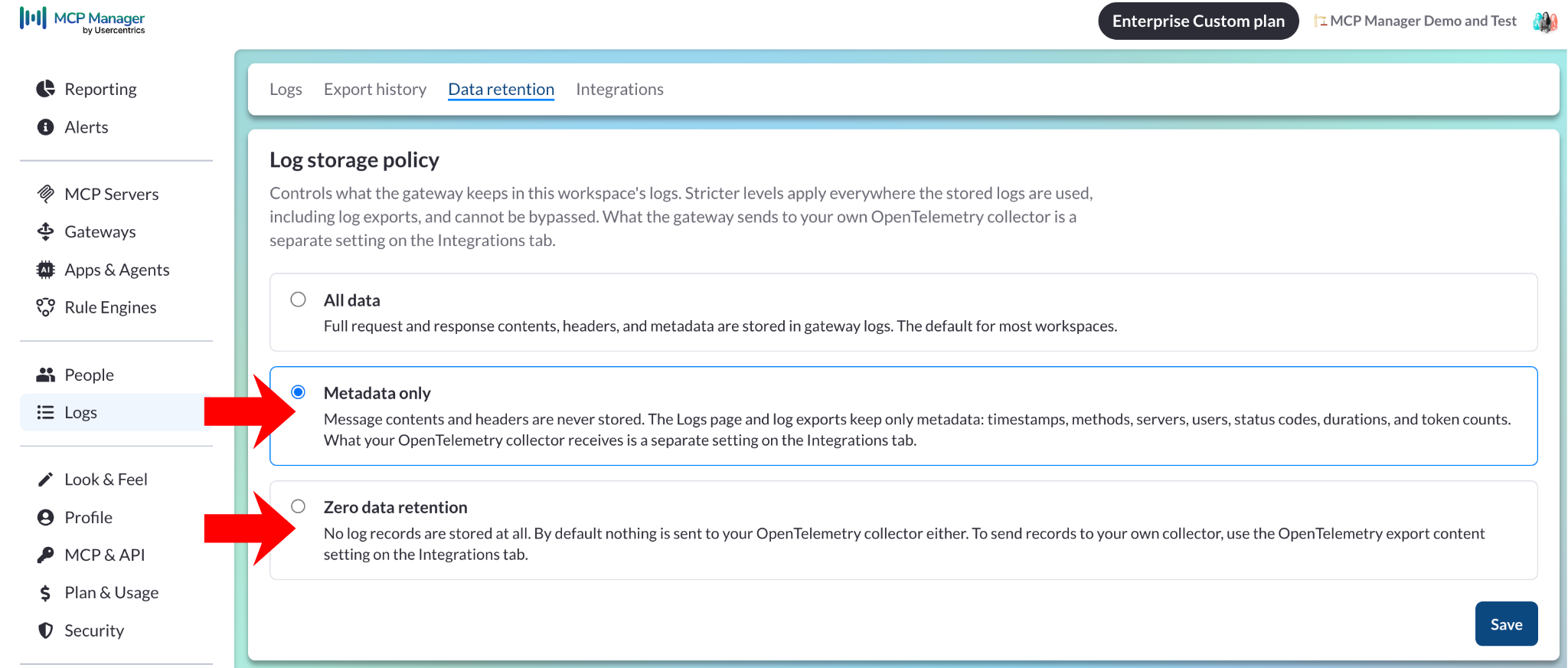
Rules do not scrub the log: the inbound client request is recorded before request-side rules run, so request-leg redaction never keeps the original out of the stored trail. Keeping payloads out entirely is the separate log storage policy, and a workspace carrying a HIPAA compliance designation has full-payload storage locked out at the gateway, so message contents and headers are never stored.
SIEM export forwards records unmasked by your gateway rules, to one OTLP/HTTP collector per organization, with no buffering if that collector is down. So the destination needs to be in BAA scope. Splunk Observability Cloud has no OTLP logs intake and requires a collector translating to HEC in front.
Built-in storage retention starts at 14 days and expands up to two years or more depending on your tier, with longer options available. To maintain compliance-grade records, stream these entries directly to your internal storage system.
Yes. Based on 45 CFR §160.103, a business associate includes any entity that creates, receives, maintains, or sends PHI on behalf of a covered organization. An MCP gateway inspects, and logs the traffic it carries, so it quires access to PHI on a routine basis and fits this definition.
MCP Manager signs BAAs using its own contract or a reviewed copy of your organization’s document on specific enterprise tiers. You can access self-service enterprise agreements to review and execute a pre-signed DPA and NDA directly on the platform.
You must explain one essential detail to your legal team: external model providers remain in your active data chain. Detection routines rely on probabilities, and documentation from both Microsoft and MCP Manager clarifies that no automated scanner detects every piece of data, with free-form text blocks presenting the hardest challenge. The gateway acts as a strong protective control that minimizes risk, but its presence does not remove downstream model vendors from your required BAA chain.
Setting Up a HIPAA-Compliant MCP Gateway: Step by Step
Execution sequence is vital. Establish your management framework before connecting any users, following the guidelines in the safe rollout sequence.
Step 1: Map Your Active PHI Footprint
Identify every server that communicates with databases containing PHI (such as EHR systems, FHIR endpoints, scheduling tools, billing systems, and patient CRMs). Place these connections on a dedicated MCP gateway so you can enforce strict rules without slowing down unrelated traffic.
Step 2: Build Your Detection Rules
Enable a Presidio rule on the response phase set to Replace and configured to Block on failure. Layer custom regex rules above it to catch your internal MRN and insurance policy patterns, since rule order determines execution sequence and a Block action stops further checks. Attach a custom scanning engine for cases where names hidden in unstructured text must be stopped.
Step 3: Enable SSO, RBAC, and Tool Provisioning
Link your identity system using OIDC, map user groups to teams via SCIM if your vendor supports outbound sync, and narrow down each server’s exposed tools to the minimum set required for the role.
Step 4: Activate Audit Logging
Point your logs collector URL to your SIEM system, including the complete /v1/logs path (the system appends no extra path data). Run a test tools/list request and confirm that records show up in your destination logs, as saving a configuration does not confirm actual log delivery.
Step 5: Secure the Client Applications
Restrict which MCP servers users can add. In Claude Code that’s managed configuration — a managed-mcp.json deployed by MDM, or allowedMcpServers / deniedMcpServers from the admin console. In Claude, admins govern which connectors can be added org-wide. Allow only your gateway URL. The honest limit: no gateway controls an unmanaged personal device.
Step 6: Execute Your BAA Agreement
Complete and sign this paperwork before moving any PHI, and verify your vendor subprocessor list against every component along the path, including the gateway, model providers, and SIEM logging destinations.
Conclusion: Governance Is What Makes Healthcare AI Possible
Blocking AI completely is a valid approach to managing risk, but it solves the issue by avoiding the technology altogether. The better path is not relaxing your rules, but moving enforcement to a location where controls can be enforced and verified, which is the gateway layer.
MCP Manager delivers inline PHI scanning, per-user activity tracking, fail-closed tool controls, and SIEM data export without needing custom software. It is backed by Usercentrics’ SOC 2 Type 2 + HIPAA report along with ISO 27001:2022 credentials. Schedule a demo to review a gateway deployment matched to your compliance needs.
FAQ
Is AI allowed under HIPAA?
HIPAA does not ban AI technology. The law requires that any system handling PHI maintains proper safeguards, access management, audit tracking, and an active BAA. AI operations that implement these safeguards are fully allowed.
What counts as PHI in an AI context?
PHI consists of individually identifiable health data created, received, stored, or sent by a covered entity or business associate (45 CFR §160.103). The 18 data types frequently cited represent the Safe Harbor de-identification standards at section 164.514(b)(2), which define when data ceases to be PHI rather than the basic definition of PHI itself.
Do I need a BAA with my MCP gateway provider?
Yes. An MCP gateway that receives and logs PHI for your organization acts as a business associate. MCP Manager signs BAAs using its standard agreement or your custom legal document on select enterprise plans.
Can PHI redaction catch everything?
No. Presidio reliably catches structured numbers that match defined formats and checksums, but it is less effective at identifying names inside short or loose sentences. Combine regex rules, Presidio, and classifier systems configured to fail closed, and keep your model providers listed on your subprocessor records.
Does MCP Manager support HITRUST and SOC 2 requirements?
These frameworks (SOC 2, ISO 27001, HITRUST) codify the same controls the Security Rule requires but aren’t compliance in themselves — they gate vendor security reviews rather than being regulatory requirements. MCP Manager’s audit logging, RBAC, and SSO map to what these frameworks assess. You can explore Usercentrics’ SOC 2 Type 2 and HIPAA report (2025), along with its ISO 27001:2022 and ISO 27701:2019 certificates in the Usercentrics Trust Center. You’ll also find a TISAX Level 3 result and a penetration test report. MCP Manager by Usercentrics can and does also sign BAAs on select enterprise plans.
How do I prevent employees from bypassing the gateway?
Limit which MCP servers or connectors team members can add using client admin controls, permitting only your designated gateway URL. Reinforce these rules using MDM profiles. Add your gateway’s static outbound IP addresses to allowlists so upstream systems block connections from any other source. Read the lockdown checklist for more details.
Where is MCP Manager hosted?
Google Cloud Platform, US region us-east1. There is no region selection today and no dedicated EU-hosted deployment, so the data MCP Manager processes and stores resides in the United States. HIPAA imposes no residency requirement, but if you need an EU copy of the audit trail,MCP gateway rules can redact PHI on the response leg before it is logged, and the log storage policy can keep payloads out of the stored log entirely, and you can forward logs to a self-hosted collector you run in an EU region. EU residency itself is under active development; if it matters to your deployment, ask your MCP Manager contact.
What’s the difference between MCP logging and HIPAA-compliant logging?
Standard MCP Logging was deprecated in the 2026-07-28 update. Even before that change, it functioned as developer debug output designed to tell a client that a tool printed a message. Gateway logging records who initiated a call, what credentials were used, what response came back, and how safety rules processed the payload across all four stages of the network request. Only gateway logging fulfills formal compliance requirements.
Becky Brooks is a Staff Product Marketing Manager at MCP Manager by Usercentrics. She has spoken at events like MCP Dev Summit NYC and Build IT Together. She is also an official Atlassian Champion. You can find her sharing information about Model Context Protocol on TikTok, YouTube, and this MCP Manager's blog.