Data retention controls are now available in MCP Manager, allowing teams that need to follow compliance frameworks like HIPAA so that the gateway never becomes another place sensitive user data lives.
Enterprise Custom plans now can choose how much its MCP traffic our platform stores, from complete request and response bodies down to nothing at all. Workspaces carrying a compliance designation have that choice narrows for them automatically, and no one on the team can widen it back.
Here’s the TL;DR:
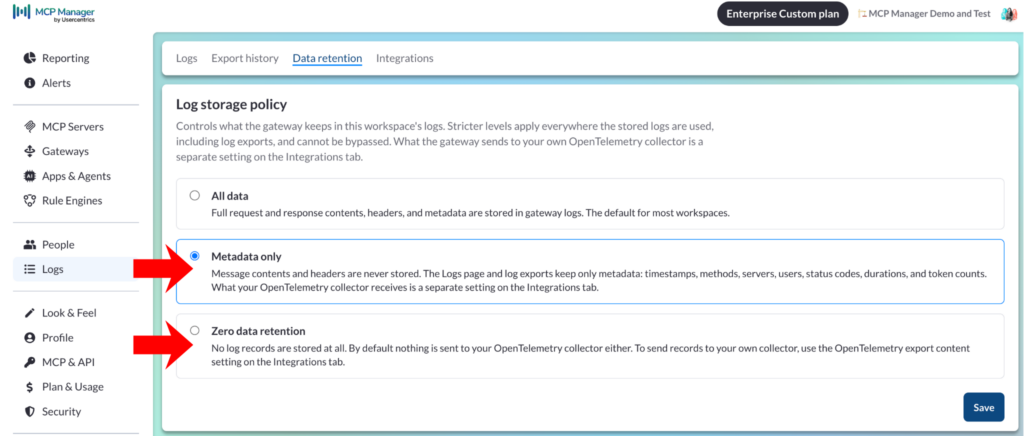
You can now choose between all data, metadata only, and zero data retention (ZDR) for logging in MCP Manager. (You can choose to mirror the same settings via OTel exports or have different settings.)
Gateway rules shape what the client receives, not what gets written down. The workspace determines what gets written down (and what doesn’t) during both ingress and egress for all MCP gateways and servers in that workspace.
If you use MCP Manager’s gateways to redact PII and PHI before calls reach AI systems, you likely don’t want full bodies in your logs.
For companies working with compliance frameworks like HIPAA, your workspace can enforce the appropriate logging settings and disallow anyone (even a superadmin) to change your workspace’s settings to log more data that it ought to. Example: HIPAA workspaces can’t have full logging.
Three levels you can choose from for logging
Full data: Everything, including request and response headers and bodies, with secrets redacted. The most complete record for debugging and forensics.
Metadata only: The log table keeps every column and every trow. The header and body columns stay empty. Message contents are never written to our store in the first place (rather than written and then cleared). What you keep is the record of the interaction (e.g. which server the AI system called, which identity and user made the call, the type of call, etc). You can still answer who accessed what and when.
Zero data retention: Otherwise known as ZDR, this allows no request or response logs to be written at all. Usage statistics live in a sperate table, so the consumption graphs in your account’s UI keep working. However, you lose the log table.
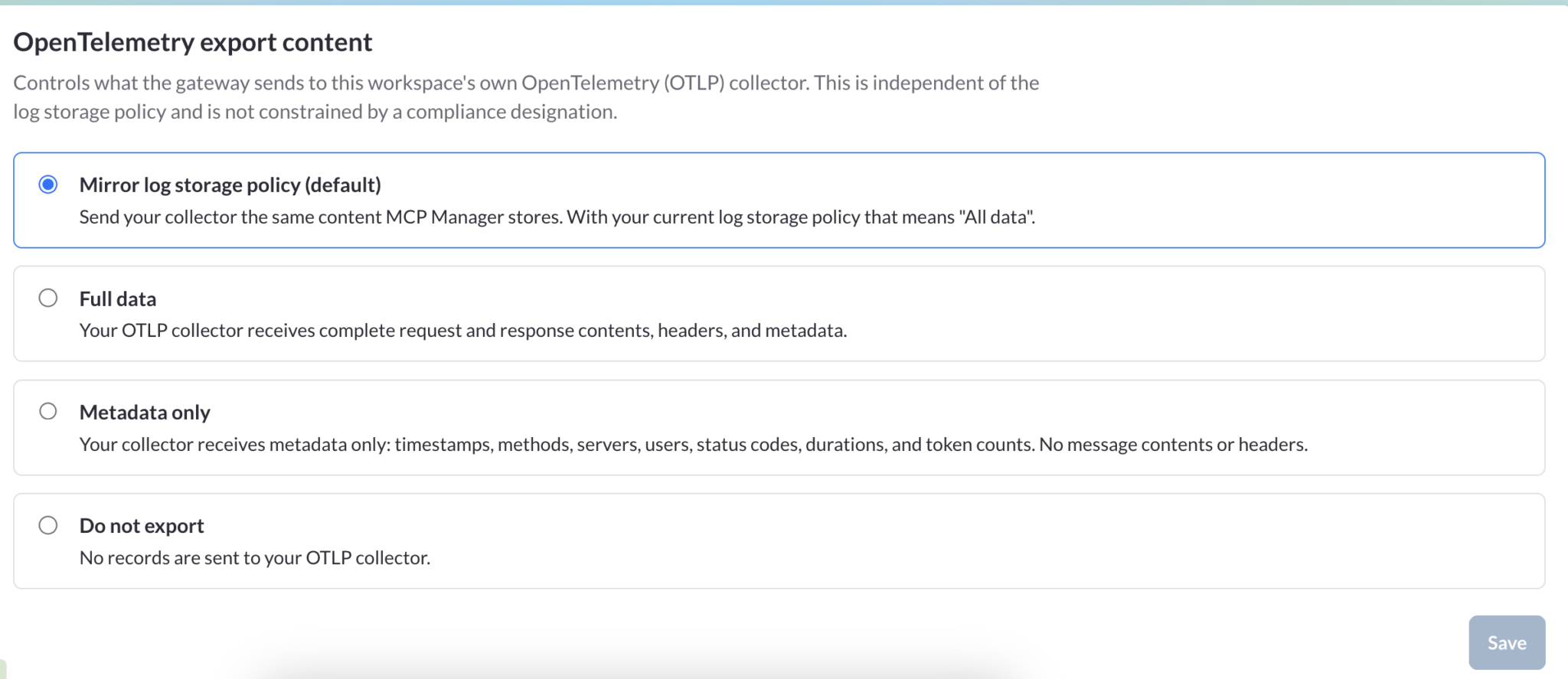
When choosing log settings in MCP Manager, you can choose a different set of logging preferences for your OTel export. Or you can have OTel mirror what our platform logs.
Enforce compliance through workspace designations
MCP Manager can designate what type of workspace you have. So, if your company works within a HIPAA framework, no one in your org can alter the settings to allow all data to flow through. (Not even a superadmin.)
When MCP Manager’s team flips a switch, flagging that your workspace must fall within a certain compliance framework, you can rest assured that “all data” logging is not available to all gateways. If your compliance framework needs meta-data only, our platform will always strip request and response bodies and headers from every stored log record at write time. This applies everywhere the stored logs are used.
Your workspace’s designation places a floor on how MCP Manager is configured. These settings cannot be loosened below the requirement, whether from the product or through the API.
However, it should be noted that exporting via OTel is deliberately not constrained by a compliance designation. That destination is your infrastructure, and the judgement about what belongs there is yours.
MCP Manager data logs vs. OTel exports
By default, OTel exports mirror your storage policy. So, if you store metadata only, then you will send metadata only. ZDR workspaces will, according to this logic, send nothing.
However, you can override it in either direction. Export less than you store (including the option to export nothing). Alternatively, you can export more than you store in MCP Manager.
One financial firm needed a 7-year retention window and accomplished this with OTel exports. While MCP Manager offers custom log retention options, log exports is another option.
Every change is on the record
Each change to a compliance designation or a storage level writes one audit record: who made the change, when they did so, and the channel it came through. You’ll also get a full before and after snapshot of the settings.
Those records live in a separate internal audit table, apart from your workspace logs. Your retention policy governs request logs, not the audit trail, which is why a compliance change is still recorded in a workspace running zero data retention. The records are append only, and the normal audit cleanup excludes them (so they are kept without a time limit).
This allows superadmins to make sure that other folks on their team aren’t flipping settings on and off.
Interested in exploring MCP Manager
You can register for a free week trial. Once you connect MCP servers to a gateway and your gateway to a client, you’ll see data start to flow.
You’ll find the Data Retention option in the Logs section of MCP Manager. Most workspaces should start at full data because visibility into your own AI traffic will help you analyze what data your servers are sending. Move to metadata only when you get familiar with the data and decide you want a more conservative posture or if your systems hold regulated data (and you need the access records without the contents). Choose ZDR in our platform when you want your own observability platform as the only system of record.
Want to explore more? Book a free demo. We’ll walk through the product and answer any questions you might have. You can also explore our platform more in the video below.
We need your consent to load the YouTube Video service!
We use a third party service to embed video content that may collect data about your activity. Please review the details and accept the service to watch this video.
Becky Brooks is a Staff Product Marketing Manager at MCP Manager by Usercentrics. She has spoken at events like MCP Dev Summit NYC and Build IT Together. She is also an official Atlassian Champion. You can find her sharing information about Model Context Protocol on TikTok, YouTube, and this MCP Manager's blog.
How role-based access control works for AI agents: scope MCP servers and tools per team, enforce least privilege, and attribute every tool call to a real...