How to Secure MCP When Your Team Uses Claude Code




Your software engineers are already attaching MCP servers inside Claude Code. The key issue is whether you have clear sight into what data those servers reach, what information travels through them, and which person approved the setup.
This guide shows you how to protect Claude Code MCP usage across your entire team so you can support AI software development while staying in total control of your company data and regulatory standards.
Summary
- Claude Code connects directly to MCP servers, but it lacks company-wide payload logging, user tracking on downstream requests, and content filters out of the box.
- Allowing developers to connect MCP servers without central management creates unmonitored AI risks, leaving you with no vision into what data agents touch or which tools they run.
- An MCP gateway sits directly between Claude Code and your MCP servers, enforcing user login, access permissions, and live policy rules on every request.
- MCP Manager routes all Claude Code MCP network traffic through one gateway URL, giving administrators central login controls, event logs, and PII masking for every developer setup.
- Combine the central gateway with Claude Code’s native managed-mcp.json files and connector allowlists to make the secure path the only available option on managed hardware.
Why Claude Code MCP Servers Need Governance
Claude Code is Anthropic’s terminal-based AI coding agent, with native MCP support. Any developer can add a server, connect it to internal APIs, databases, or third-party services, and start issuing commands.
How Claude Code Connects to MCP Servers
Claude Code supports four transports:
- stdio for local processes
- HTTP (streamable HTTP, the recommended option for remote servers)
- SSE (deprecated in favour of HTTP)
- WebSocket for servers that push events
Servers are configured at three scopes, local, project (.mcp.json, committed to the repo), and user, plus plugin-provided servers and claude.ai connectors.
Whichever transport and scope, the agent reaches whatever the server exposes: file systems, databases, APIs, CRMs, ticketing systems. The project scope is the one to watch, because a .mcp.json checked into a repository travels with the repository.
Where Claude Code’s Built-In Controls Stop
Authentication at the individual level is handled competently, OAuth 2.1, PKCE, dynamic client registration, and the client secret held in the system keychain on macOS or a credentials file elsewhere.
What’s missing is organizational: no single point where every call is attributed to a person, inspected for sensitive content, and recorded in full. Claude Code’s OpenTelemetry export identifies which servers and tools were invoked; it does not capture the payloads those servers returned.
The permission prompt has the same shape: a developer-side control, not an organizational one. A denial only holds for the current session, permission modes such as acceptEdits and bypassPermissions skip prompts entirely, and claude -p and SDK runs load project-scoped servers without asking at all. For one developer experimenting locally that’s fine. Across fifteen or fifty engineers connected to production systems, it’s a compliance gap.
The Specific Risks
Claude Code inherits the same threat model as MCP anywhere. Tool poisoning hides instructions in a tool’s description or schema, which is read straight into the model’s context. A rug pull is different and worth separating: a server you already approved quietly changes a tool’s behaviour or description afterwards. Indirect prompt injection arrives in tool results — a Jira ticket, a Confluence page, a fetched document carrying text the agent then acts on. And data leakage happens when an agent pulls personal data from a CRM or database into the model’s context.
MCP Manager’s security overview maps each of these to the layer that addresses it, which is the useful way to think about them: metadata threats are a provisioning problem, in-flight content threats are a runtime problem, and they need different controls.
The exposure isn’t hypothetical. Gartner predicts that by 2027, 40% of enterprises will demote or decommission autonomous AI agents because of governance gaps identified only after a production incident.
How to Manage MCP Servers Across Claude Code for a Whole Team
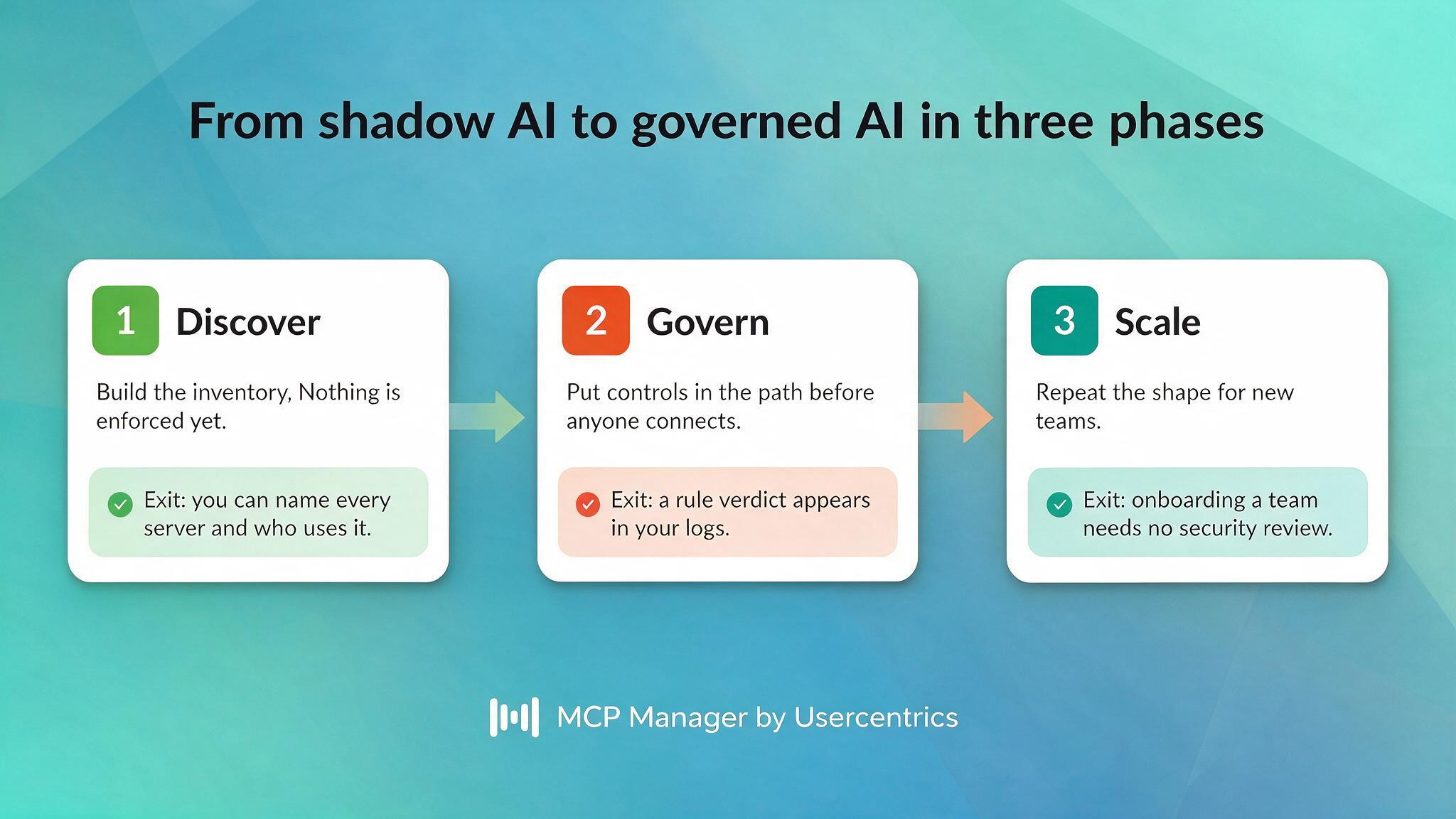
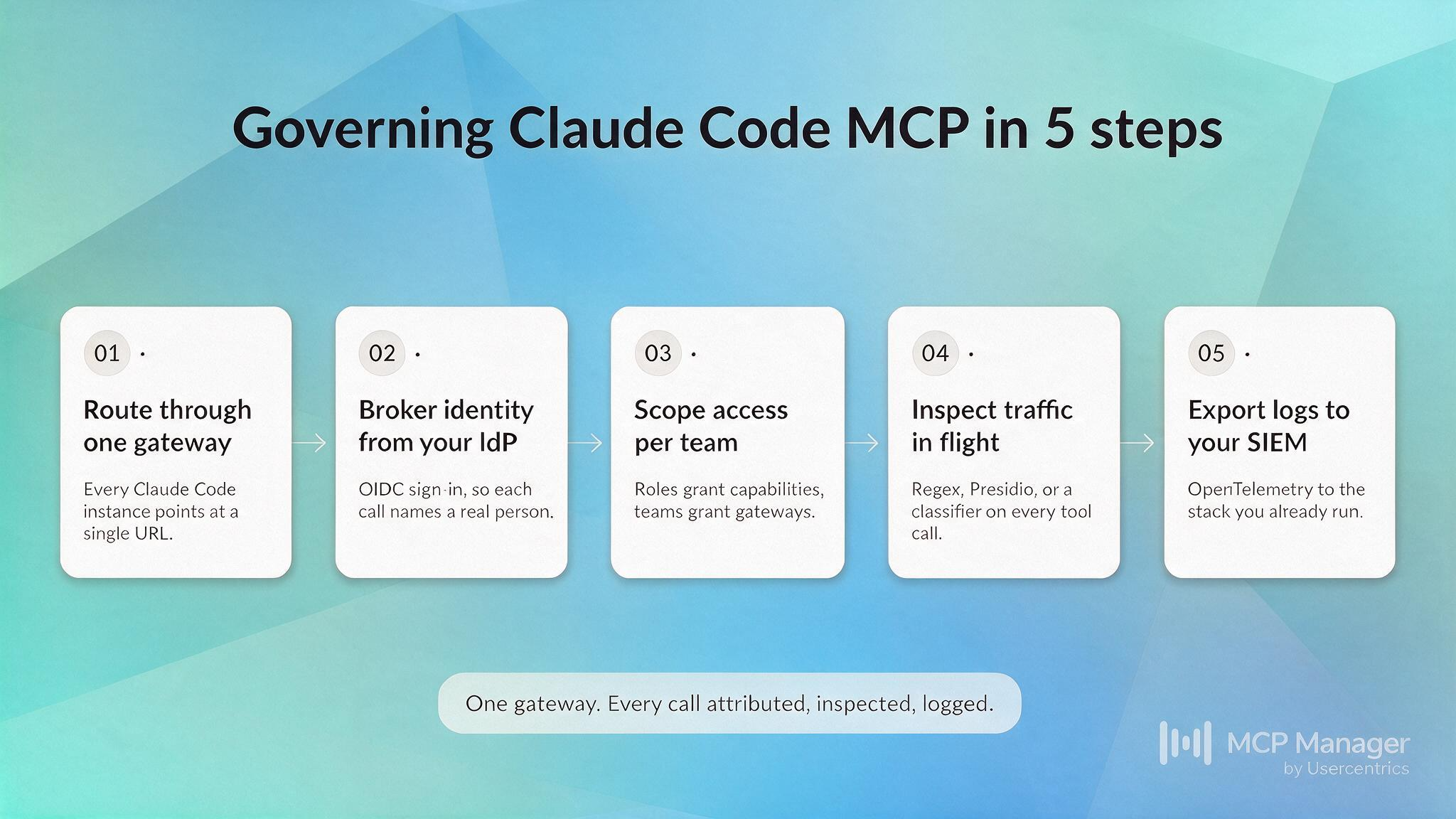
Managing Claude Code MCP at team level means moving decisions off the developer’s laptop and into one place: which servers exist, who each caller is, what they can reach, and what gets recorded. The steps below do that in the order that keeps governance ahead of traffic.
Step 1: Route All MCP Traffic Through a Gateway
Rather than letting every developer configure network servers individually, point every setup to a single MCP gateway URL. Within Claude Code, you can configure this using one simple command:
claude mcp add –transport http <gateway-name> “https://app.mcpmanager.ai/gateway/v1/mcp/<your-gateway-id>” –scope user
The developer logs in once inside their web browser, gaining access to every approved MCP server through that single connection. Make sure to use the exact path format for the gateway URL instead of using a ?gateway= query parameter. Claude Code compares connector targets after stripping query strings, which can accidentally merge multiple gateways together into one.
Local servers are covered too. A workstation server runs a small tunnel agent in Docker that dials outbound to MCP Manager over a WireGuard-based encrypted tunnel. This design requires no open incoming ports and exposes no services to the public internet. The server remains on the local laptop while all data passes through the central governance system.
This setup also brings an essential credential benefit: the developer laptop only holds an MCP Manager access token. High-privilege GitHub PATs and database passwords are moved out of local mcp.json files and stored inside an AES-256-GCM vault with automatic key rotation.
[Source: https://docs.mcpmanager.ai/mcp-gateway-concepts/architecture-and-trust]
Step 2: Set Up Per-user Identity via Your Existing IdP
MCP Manager manages single sign-on over OpenID Connect through Auth0, allowing integration with any standard OIDC identity provider like Okta, Microsoft Entra ID, Google Workspace, or Keycloak. Once connected, every tool call includes the identity of the engineer who triggered it. The MCP gateway passes that identity to downstream systems, allowing main databases to record the actual person instead of a generic shared account. This step transforms basic system telemetry into undeniable audit records.
Automated user removal works through SCIM 2.0. Be sure to verify your provider capabilities first: outbound SCIM requires the Lifecycle Management add-on for Okta and a P1 or higher plan for Entra ID, while Google Workspace and Keycloak only support basic SSO today. The supported identity providers page lists the complete details.
Step 3: Define Per-team Access Controls
Different developers require access to different tools. Access permissions are calculated where user roles meet team memberships. System roles determine user capabilities (actions allowed), while team memberships grant access to gateways (destinations allowed). On top of that, feature provisioning determines server access by allowing all tools, allowing only tools matching explicit conditions, or blocking all access completely. This conditional access model defaults to closed, meaning a tool stops working immediately if its description changes after initial approval.
This exact mechanism defends against rug-pull attacks. Explicitly approving specific tools by name, title, and exact description ensures that altered tool metadata never reaches the AI model context.
Step 4: Apply Runtime Guardrails
Gateway rules inspect incoming and outgoing network traffic in real time, checking tool arguments on the request step and payload responses on the output step. Three detection systems are used:
- Regular expressions scan structured text in memory for payment cards, SSN identifiers, AWS secret keys, or known injection phrases. Actions include block, redact, replace, mask, or hash.
- Microsoft Presidio acts as a managed engine to detect unstructured PII like names, email addresses, and physical locations. Supported actions are block and replace.
- Custom rule engines integrate with AWS Bedrock Guardrails, Lakera Guard, and Google Model Armor, or connect to your own external webhook.
Keep two structural limits in mind. Presidio spots private user information, but it cannot analyze malicious text patterns or prompt injections. Machine learning classifier engines are required for prompt injection defense. In addition, rules only evaluate tools/call actions and do not inspect prompts/get or resources/read steps. Keep injection-prone assets behind tool interfaces and use feature provisioning to limit exposed resources.
Safety rules apply per gateway instead of globally across all teams. You can block all PII on a CRM gateway while applying lighter checks on an internal documentation gateway.
Step 5: Ship Logs to Your Existing Observability Stack
MCP Manager exports formatted logs and individual call traces using OpenTelemetry (OTLP/HTTP) to external monitoring systems like Datadog, Grafana Cloud, New Relic, Honeycomb, or a self-managed OpenTelemetry Collector. Because Splunk Observability Cloud does not ingest raw OTLP logs directly, send traffic through a self-hosted collector to convert data to HEC format.
Every call logs across four connected steps linked by one correlation_id. Each entry records the user identity, the tool executed, latency stats, estimated token counts, and the rule engine decision. Default log retention depends on your account plan, starting at 14 days and extending to a year or longer. You can export data to external cloud storage for extended retention needs.
Is It Safe to Let Engineers Add MCP Servers in Claude Code?
It is unsafe without active controls. Anthropic reviews listed connectors against general guidelines, but explicitly does not run security audits or manage external MCP servers. By default, anyone running Claude Code can connect any server they choose, including private APIs, live production databases, and third-party tools with high privileges.
What “safe” Actually Requires
You need a managed path that is far easier to use than an unmonitored path, backed up by strict hardware controls. Claude Code provides both controls directly, giving you stronger options than most engineering teams expect:
- managed-mcp.json deployed to a system path (/Library/Application Support/ClaudeCode/ on macOS, /etc/claude-code/ on Linux, C:\Program Files\ClaudeCode\ on Windows) takes exclusive control. Claude Code then loads only the servers that file defines. Users can’t add others, plugin servers are suppressed, and –mcp-config is rejected at startup. Deploy it with Jamf, Intune, Group Policy, or your fleet tooling.
- allowedMcpServers with allowManagedMcpServersOnly: true in a managed settings source enforces an allowlist users can’t broaden. Match on serverUrl or serverCommand — serverName is a user-assigned label and not a security control.
- Client connector allowlists on Claude and ChatGPT team and enterprise tiers restrict which connectors users may add at all.
Limiting access to your central gateway URL makes the governed path the only default option. MCP Manager cannot stop someone from using a raw API key on an unmanaged personal device, but on managed company computers, the central gateway becomes the only working route and makes any workaround clearly visible in audit logs.
Best Practices for Claude Code MCP Security
Configuration decides what’s possible; these best practices decide what actually happens. Each one is a default worth setting before your first production gateway, because every one of them is easier to get right at five engineers than to retrofit at fifty.
Start With Non-Destructive Tools Only
Tool annotations in MCP Manager’s gateway let you allow read-only and/or write-only tools, rather than approving entire servers. This way, you can disallow destructive tool access. Open up delete permissions selectively after reviewing real usage traffic.
Filter PII Before It Reaches the Model
You cannot recall information once it is delivered to an external LLM or third-party service. Stopping data at the gateway level is the only reliable control, and keeping log records of every redacted item gives you concrete evidence for security compliance audits.
Treat MCP Logs as Security Telemetry, Not Debug Output
Treat MCP logs as active security monitoring data rather than temporary debugging logs. Standard local logs confirm whether a call worked, but they fail to record user identity or response content. Capturing full request contexts requires a dedicated gateway in the network path.
Lock Down Configuration at the Endpoint
Lock down configuration settings on user devices. Deploy managed-mcp.json files using MDM tools rather than relying on allowedMcpServers settings by themselves, as allowlists merge across different settings levels unless allowManagedMcpServersOnly is explicitly set. This step secures local devices while the gateway secures network traffic.
Audit Before You Scale
Run a pilot before expanding access across teams. Test one gateway with a small group of engineers before rolling it out to the whole company. Turn on OTEL_LOG_TOOL_DETAILS=1 in Claude Code’s OpenTelemetry configuration to view which servers and tools your developers rely on, then use that data to shape your rules and access lists. Test new rules in alert-only mode first to monitor results, then switch to active blocking once verified.
What Comes Next
If your software developers already use Claude Code with MCP servers, you face two choices: set up governance today, or review the logs after a security breach occurs.
MCP Manager delivers a central gateway, user identity tracking, live safety guardrails, and audit logging to secure Claude Code MCP for enterprise teams. Your software developers can keep their normal workflow intact using one gateway URL and one SSO login, while safety guardrails execute silently in the background.
Book a demo with the MCP Manager team. We’ll map your current MCP usage, show you what a governed gateway would log, and tell you where the gaps are before you roll Claude Code out further.
FAQ
How does MCP Manager work with Claude Code specifically?
You attach the central gateway as an HTTP server by executing claude mcp add –transport http. The developer signs in once in their browser, making all permitted tools on that gateway available through a single connection. Review the connect-your-client walkthrough for full setup details.
Can MCP Manager govern local MCP servers running on a developer’s laptop?
Yes, by setting them up as workstation servers. A Docker proxy opens an outgoing WireGuard tunnel directly to the gateway. The local server remains on the laptop without opening incoming ports, while all traffic passes through the same safety checks, log logging, and access rules used for remote servers.
Does routing through a gateway add latency to Claude Code?
Basic routing and forwarding typically add 150 ms or less per request, which is negligible compared to model generation times. Regex rules run in-process and are effectively free. External engines like Presidio or Bedrock add their own round trip, bounded by a 30-second timeout.
What happens if a server or a rule engine fails?
A single server outage stays isolated. Its associated tools disappear from the available list, attempts to reach it return a clear error, an admin alert triggers, and the rest of the gateway continues operating. The server reconnects automatically upon recovery. Rule engine failures follow per-rule settings: custom webhooks default to Block (fail-closed), Presidio defaults to Allow (fail-open), and regex checks have no failure points. Set rule failure modes to Block for sensitive data that must never be exposed.
Can I prevent engineers from bypassing the gateway entirely?
On managed devices, close to it. managed-mcp.json gives Claude Code exclusive control over which servers load and rejects –mcp-config. Combined with client connector allowlists and MDM, the gateway becomes the only reachable path. Unmanaged personal devices remain outside any gateway’s reach.
Does MCP Manager support SSO with Okta and Microsoft Entra ID?
Yes. Sign-in uses OIDC federated through Auth0, supporting any conformant provider. SCIM 2.0 user management works with Okta (with the Lifecycle Management add-on) and Microsoft Entra ID (P1 plan or higher), alongside other supported identity systems.
How is MCP Manager different from building our own gateway?
The proxy is two to four weeks. The cost is underneath: your gateway must be an OAuth authorization server to your agents and an OAuth client to every upstream at once, and no two behave alike. See the build-vs-buy analysis.