Enterprise AI Security: How to Secure AI Adoption at Scale




You can keep AI adoption safe across your company without slowing things down. The trick is a clear security program that gives teams safe access to AI tools, puts safety rules in front of every call, and creates audit logs that satisfy both company rules and outside regulators. This handbook shows you step by step how to set one up.
Most companies are stuck in one of two setups: they block AI completely, or they run it with no rules at all. Neither option works, and blocking it usually leads to employees using it secretly. Enterprise AI security acts as the baseline that allows big AI projects to succeed, rather than standing in their way.
Key Takeaways
- Enterprise AI security begins with visibility: if you cannot see a tool, you cannot manage it, so make a full list of every AI client, agent, and MCP server used in your company.
- Rolling out in stages (discover, govern, scale) stops you from getting trapped between total bans and uncontrolled growth.
- Safety rules like PII filtering, individual user accounts, and tool-level permissions let you approve AI use without taking on dangerous risks.
- Keeping detailed audit logs tied to specific users is required by law in finance and healthcare, and auditors check for it everywhere else too.
- An MCP gateway handles control over agent-to-tool connections in one place so security teams do not have to manage every setup manually.
What Does an Enterprise AI Security Program Look Like?
An enterprise AI security program is a setup of guidelines, safeguards, and software that controls how AI clients and agents connect with company data and tools. It handles user identity, permissions, data protection, tracking, and incident handling for AI tasks specifically.
The Governance Gap Is the Actual Risk
AI itself is not the main danger. The real danger is AI without rules. The IBM 2026 Cost of a Data Breach Report, which looked at 602 companies hit by breaches between March 2025 and February 2026, showed that over 20% had attacks aimed at AI models or apps. The main entry points were hacked APIs, software, or plug-ins (27%) and bad cloud setups affecting AI projects (27%).
The report also showed that hidden shadow AI cases more than doubled year over year to 43%, and over two-thirds of breached companies had zero rules set up to control it.
The real threat is not advanced model attacks. It is simple gaps in access controls and connection points where AI links to your software.
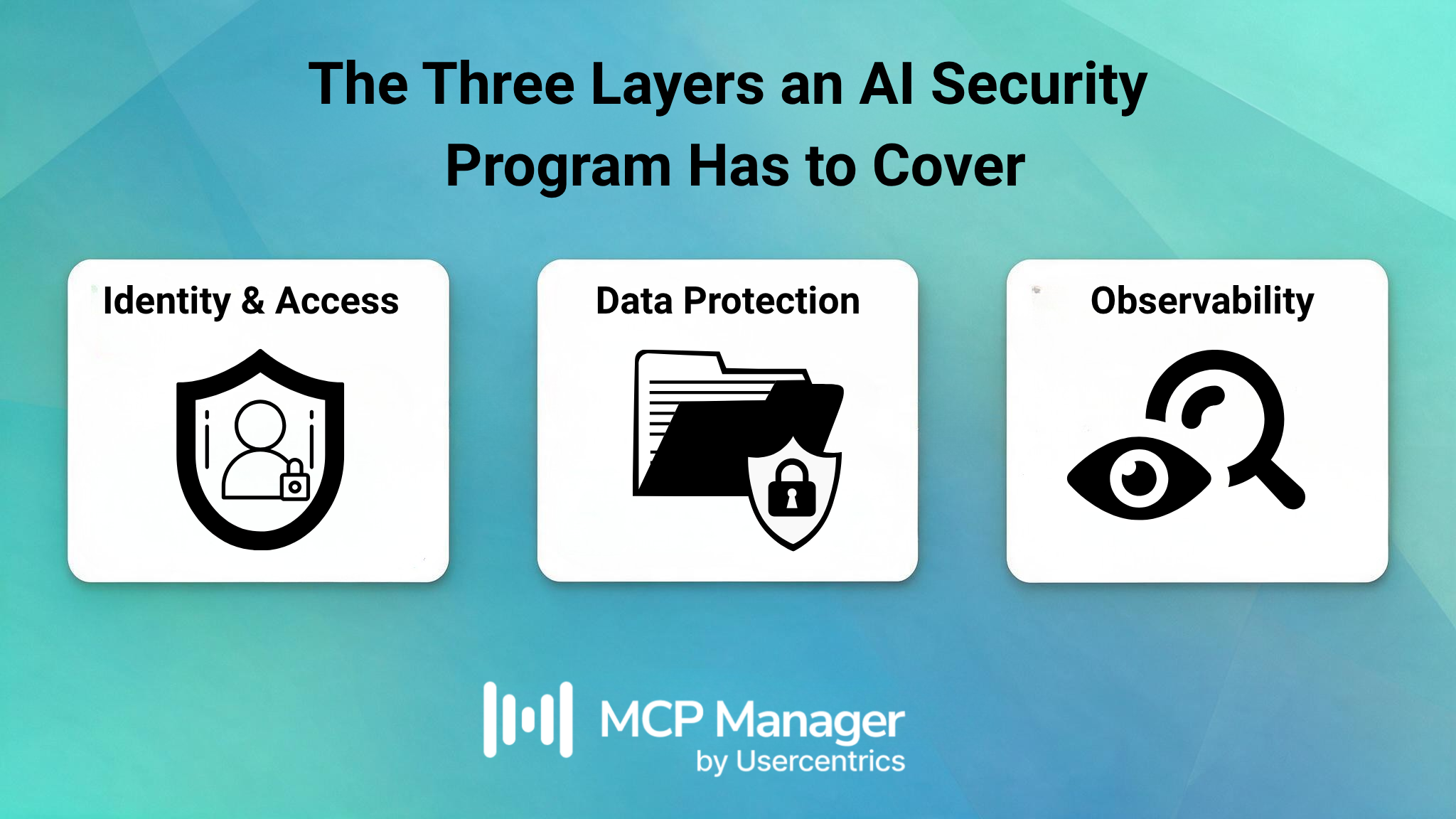
The Three Layers an AI Security Program Has to Cover
A complete enterprise AI security setup fills that gap across three main areas:
How to Enable AI Without Creating Security Risk
The secret is setting safe boundaries: add safety checks so employees can use AI tools freely while blocking the exact steps that create security dangers.
Stop Treating Governance as a Brake
Banning AI completely does not stop people from using it. It just causes unmonitored AI use, which is why shadow AI now figures in 43% of security incidents. You are not choosing between fast adoption and safety controls. You are choosing between AI usage you can track and usage you cannot see.
Setting up clear rules actually speeds up adoption by removing step-by-step approvals. When a team starts a project and finds pre-checked connectors ready on a gateway, they do not need to fill out tickets or wait for security reviews. Any request outside that list follows a simple approval step. Waiting for manual approval, not the rule itself, is what slows work down.
The Controls That Matter Most
Three controls do most of the work in an enterprise AI security program:
- filtering PII before it leaves your boundary
- brokering each user’s own identity to the downstream system
- provisioning tools fail-closed so a gateway exposes only what the task needs
All three act in the path of the call rather than in a review meeting, which is what separates a control from a policy.
PII Filtering Before Data Reaches the Model
Blocking sensitive data beforehand is the only sure path, because you cannot undo data transfers after they happen. Once data reaches an outside AI provider, deleting it depends entirely on their terms. Additionally, when personal details are used to train systems, EDPB Opinion 28/2024 states that models trained on personal data cannot be treated as anonymous without careful case-by-case checks.
Stop data right at the gateway instead. You can adjust MCP Manager’s gateway rules on each gateway separately, so the gateway linked to your CRM can use tighter checks than the one connected to Jira. You can spot data using regex (runs locally, acts predictably, and can block, redact, replace, mask, or hash text), Microsoft Presidio for unstructured text like names or addresses (which can block or replace), or custom webhooks like AWS Bedrock Guardrails, Google Model Armor, and Lakera Guard. How these systems fail is important to note: Presidio defaults to letting traffic pass on errors, custom tools default to blocking traffic, and local regex does not rely on web calls at all. For sensitive files, set the failure mode to Block.
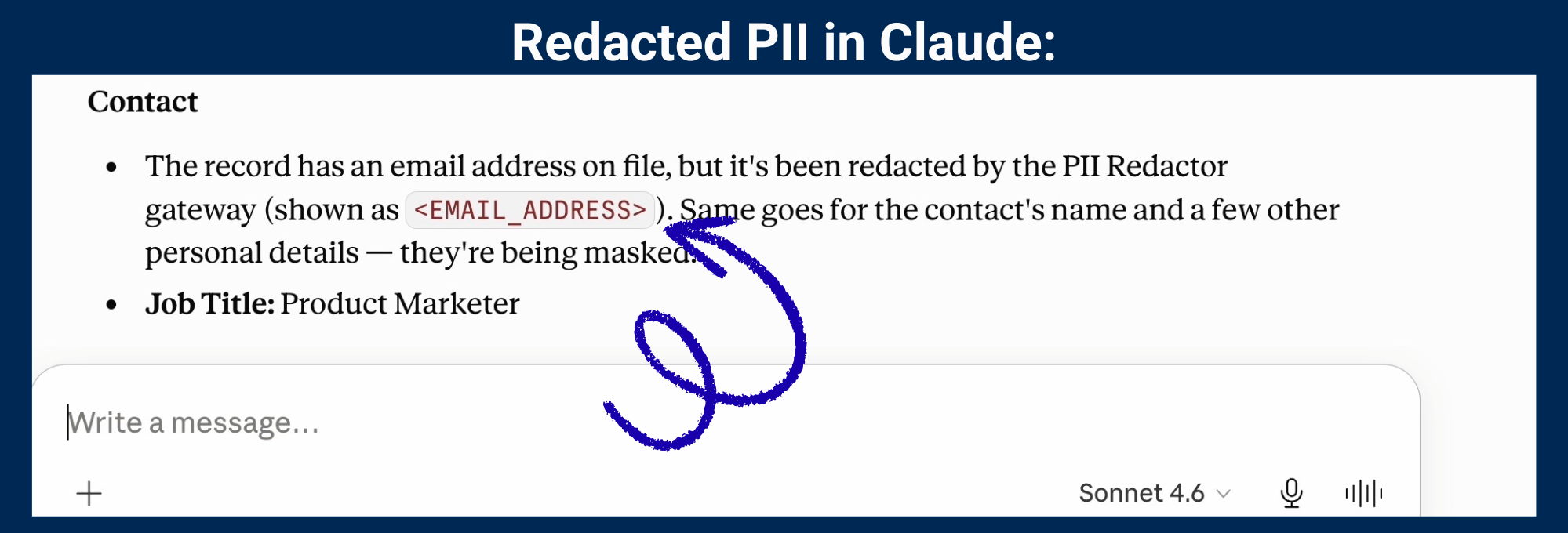
MCP Manager’s gateways redact PII from hitting AI clients:
Per-User Identity, Not Shared Service Accounts
Under DORA rules active for EU finance firms since 17 January 2025, the ICT risk-management RTS requires clear identification for every person and tool reaching data (Article 20) alongside strict activity tracking (Article 12). Sharing one token loses that user trail right away. A gateway that passes each user’s real account to the target server keeps tracking intact, so your systems and logs always show the actual person.
Tool-Level Provisioning
Pinning a tool by its name, title, and description means a silently changed description stops passing the gateway — a concrete defense against rug pulls and tool poisoning. Feature provisioning also decides which tools, resources, and prompts a gateway exposes at all, so an agent’s reachable surface is an explicit allowlist rather than whatever the upstream server happens to offer.
What Is a Phased AI Security Rollout?
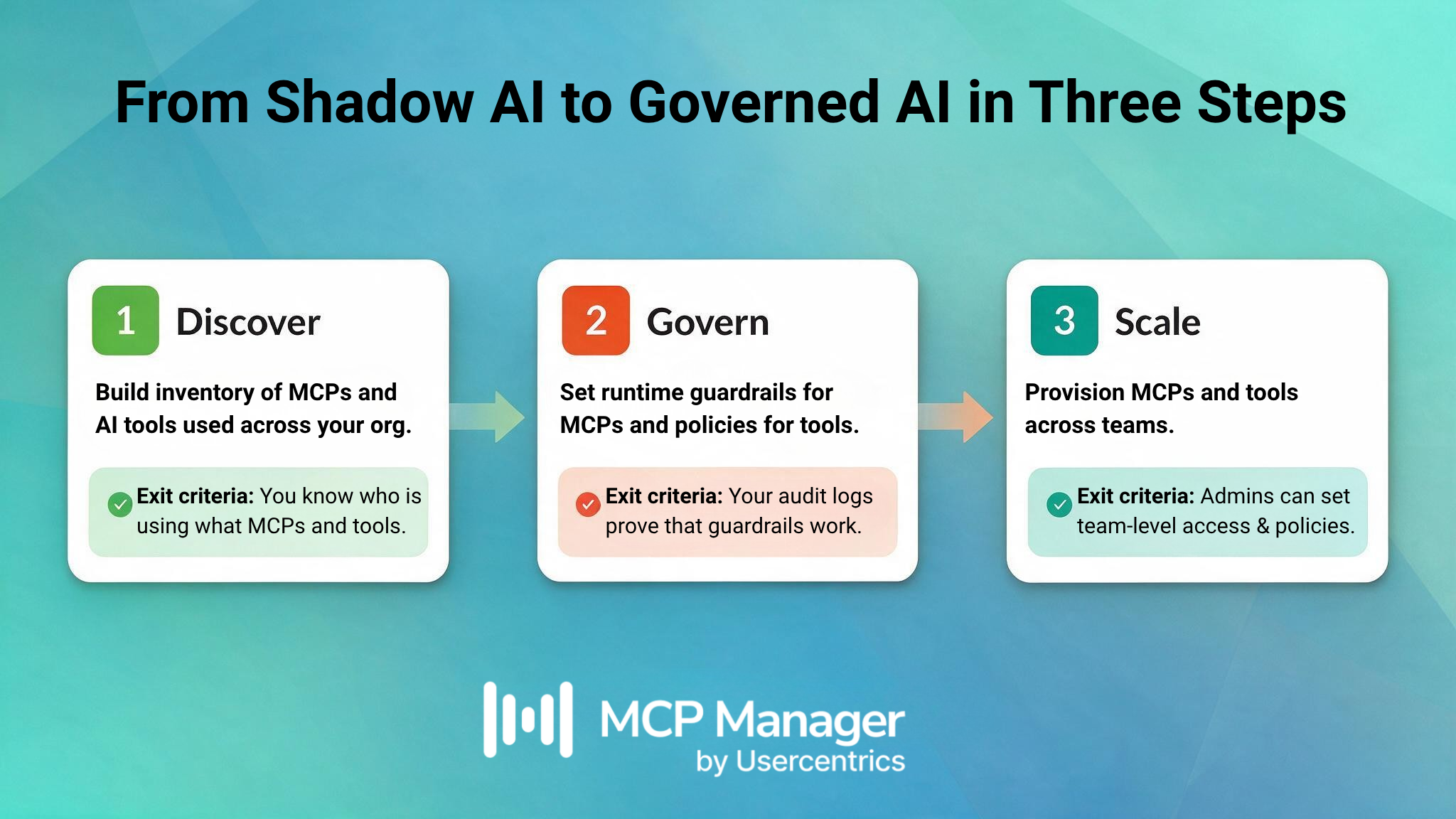
A planned rollout works through three distinct steps: discover, govern, and scale. Trying to complete all three at once usually makes the project fail.
Phase 1: Discover
You cannot protect what you cannot see, and the core MCP protocol will not help you here, because it only covers how clients and servers communicate without offering company-wide tracking. You need to create a complete inventory first.
- Review all AI client usage (Claude, ChatGPT, Cursor, Copilot, coding agents) across your teams.
- Find every MCP server connection, both approved ones and unofficial ones. Local stdio servers running on developer laptops are the hardest to find and the easiest to overlook.
- Chart how data moves. Find out which agents connect to which internal systems and what types of data they touch.
- Write down your current setup accurately. If you currently rely on an honor system, record it clearly.
MCP Manager supports both remote and local MCP servers. Local ones keep running directly on the laptop, and a containerized tunnel agent links them up to the gateway, so laptop MCPs stay governed.
Phase 2: Govern
After listing your setup, turn on your security controls. This step uses a MCP gateway as your central control checkpoint.
- Send all MCP connections through one shared gateway URL so every AI tool connects to a single web address.
- Turn on SSO so every action links to a real person, and set up your server identity model carefully.
- Set your safety rules in place before opening the gateway to users. Following the safe rollout sequence matters because data starts moving the moment the first user connects.
- Turn on log exports over OpenTelemetry (OTLP/HTTP) to send activity data straight to your security tools or SIEM.
- Secure your client apps. Company plans for major AI clients let administrators restrict allowed connectors, so you can lock users to your gateway URL alone.
Here is a technical update to keep in mind: since the 2026-07-28 MCP revision, tool and method names pass inside Mcp-Method and Mcp-Name HTTP headers. This allows a gateway, speed limiter, or firewall to read headers instead of scanning full JSON bodies. That same update improved login security using RFC 9207 checks, locked user tokens to their official provider, and deprecated Dynamic Client Registration in favor of Client ID Metadata Documents.
These updates fix real protocol gaps, but you still need your own tools to build a full inventory, set content rules, or save audit logs.
Phase 3: Scale
When governance works smoothly for your initial team, expand it everywhere.
- Add checked servers to extra gateways as teams ask for them, separating them by team or task as security rules require.
- Check your reporting pages to track total calls, speeds, error counts, and triggered rules. Sudden spikes help you spot issues in your raw logs quickly.
- Include local developer setups. Workstation servers link laptop-based MCP servers to your main gateway using outbound-only WireGuard tunnels. This keeps local servers safe from direct internet exposure while still tracking and checking every call.
- Automate your user access. Use SCIM 2.0 to sync user groups from your main identity tool to your teams, so access and removal update automatically with your company organization chart.
Best Practices and Real-World Examples
Most AI security programs fail on sequencing rather than on control selection. The controls in the previous section are well understood; what separates a program that holds from one that gets bypassed is the order you deploy them in, whether you tested them against your own traffic before enforcing, and whether you were honest about what they don’t cover. The practices below are ordered roughly as you’d hit them.
Don’t Wait for the Perfect Policy
Start using basic safety controls right away. A simple rule you can set up and test today in a trial helps far more than a long policy text that no one enforces.
Roll Rules Out in Alert-Only Mode First
Run a new rule on safe actions with alerts turned on, watch what traffic it flags, adjust your search terms, and only then set it to block. Turning on strict blocking right away often causes false alarms on day one.
Treat Documentation as Part of the Security Program
If a control requires complex training to work, people will not use it consistently.
Plan for the Bypass Attempts
An MCP gateway only protects traffic passing through its connection point. It cannot control what a desktop AI app does locally on a laptop, like reading files or grabbing screenshots, because that traffic does not use MCP. That work falls to your endpoint security layer. Building defense in depth means linking your gateway with device management (MDM/EDR), approved client lists, and network firewalls with set IP rules.
Measure What Matters
Track data that shows real safety improvements. Measure how often safety rules block actions rather than counting total tool rollouts. If PII filtering triggers repeatedly on a single server, update the source application or your approved tool list instead of just tuning the filter.
Name What You Don’t Cover
Be clear about what your system does not cover. Web browser AI usage falls completely outside the MCP layer, meaning it requires separate CASB or EDR protection. Being open about these boundaries builds more trust with security leaders than claiming total coverage.
Build the Foundation Before the Headline Finds You
Enterprise AI security separates companies that expand AI successfully from those that get stuck in basic trials. The overall scale of usage is clear: Zscaler’s ThreatLabz 2026 AI Security Report noted that data sent to AI and ML apps grew by 93% to over 18,000 terabytes in 2025, while the number of AI-enabled tools grew four times over to more than 3,400. More tools and data mean more ways for information to leak out.
Because of this growth, checking tools manually one by one does not work. You cannot evaluate 3,400 software connections using support tickets, which is why your security controls must be built directly into your network setup.
MCP Manager provides security and compliance leads with the tracking, safety rules, and audit trails necessary to approve AI usage safely. Start with a quick pilot on one team. Book a demo and we’ll set it up against your own stack, so you can see how your employees are actually using AI today.
FAQ
What is enterprise AI security?
Enterprise AI security is the set of policies, controls, and tooling governing how AI clients and agents reach business systems and data. It covers identity, access control, PII filtering, audit logging, and incident response, applied specifically to AI and MCP workflows rather than bolted onto general IT policy.
How do you secure AI adoption without blocking innovation?
Set guardrails defining what AI can and cannot access instead of blocking it outright. PII filtering, tool-level provisioning, and per-user identity let teams move fast while preventing data leaks. Blocking tends to convert visible usage into shadow AI rather than eliminating it.
What are the biggest enterprise AI security risks?
Ungoverned agent access to sensitive data, shared service accounts that destroy audit attribution, PII leaving your boundary irreversibly, and shadow AI. MCP-specific risks include tool poisoning, rug pulls, and over-provisioned tool sets. The OWASP Top 10 for LLM Applications covers the injection categories.
What is an MCP gateway and why does it matter for security?
An MCP gateway is a control point between AI clients and the tools they reach. It authenticates the caller, resolves which servers and tools they may use, brokers the right identity upstream, applies content rules both directions, and logs every hop — one place to govern all agent traffic.
How does PII redaction work in an MCP gateway?
Rules inspect tool arguments outbound and results inbound. Detection uses regex, Microsoft Presidio, or a custom engine such as AWS Bedrock Guardrails. Matches can be blocked, redacted, replaced with a typed tag, masked, or hashed. Rules are set per gateway.
What compliance frameworks does enterprise AI security support?
Programs typically map to GDPR, DORA (unique identification and logging under RTS 2024/1774), and HIPAA.
How do you handle local MCP servers in an enterprise security program?
With MCP Manager, a local server keeps running on the workstation while a containerized tunnel agent connects outbound to the MCP gateway over WireGuard. No inbound port opens and the server never touches the public internet, but the same rules, identity controls, and logging apply as to any remote server.
Can an MCP gateway integrate with existing security tools?
Yes. Logs and traces forward over OpenTelemetry to any conformant collector, such as Datadog, Grafana Cloud, New Relic Sign-in is OIDC, provisioning is SCIM 2.0, guardrail systems connect via HTTPS webhooks.
Want to explore more? Watch an overview of what an MCP gateway is below. Then book a demo to explore our platform in more depth.