
Why MCP Manager
This page will help you understand how your organization will benefit from using a solution like MCP Manager, and particularly how it will deliver ROI.
It’s an ideal resource to help construct your business case, understand the benefits MCP Manager will provide your organization, and how MCP Manager differs from other MCP security and management platforms.

Why Organizations Use MCP Manager
Model Context Protocol (MCP) servers are essential for connecting AI to your applications, systems, data, and other resources. MCP servers unleash the long-promised value of generative AI, and as predicted, their presence in our organizations and workflows is increasing rapidly.
But adopting MCP servers at scale is challenging and risky.
Using MCP servers can compromise governance of data privacy and security, and create security vulnerabilities that attackers can exploit. MCP servers are also difficult to deploy at scale without specialist expertise or expensive consultant support. There’s no logging or observability out of the box either, which creates justifiable concern among IT, data protection, and information security teams.
MCP Manager solves these challenges and provides the deployment solutions, data access controls, security guardrails, and observability features that organizations need to adopt MCP servers with ease, confidence, and control.
Key Benefits of MCP Manager:
- Deploy MCP servers at scale without specialist expertise
- Ensure MCP and AI use complies with data privacy and security regulations and policies
- Controlled access to data and resources with granular RBAC and full traceability
- Secure all MCP severs in your organization – including local MCPs
- Complete visibility over all MCP traffic, with end-to-end logging, alerts, and reporting
- Protect your organization against MCP-based security risks
- Improve the efficiency and performance of LLMs and AI agents
- Reduce the costs of your MCP usage
What Makes MCP Manager Different?
Most MCP gateways only provide basic security guardrails and don’t provide users with the deployment solutions and observability features that reduce their MCP servers’ time to value and cost of deployment.
Compared to other MCP gateways and MCP management platforms, MCP Manager’s user and identity management architecture is far more sophisticated, secure, and better equipped for scaled MCP server use.
MCP Manager combines the deployment, security, and observability capabilities that organizations need to successfully and securely use MCP servers at scale.
MCP Manager provides you with:
- Deployment solutions that get MCP servers into production while saving hours of staff time for each server added
- Security guardrails that protect your organization against security risks, attacks, and the costs you incur from them
- Observability features that enable you to monitor and optimize MCP usage, security, performance, and overall MCP ecosystem health, to help AI initiatives deliver better ROI and long-term impact
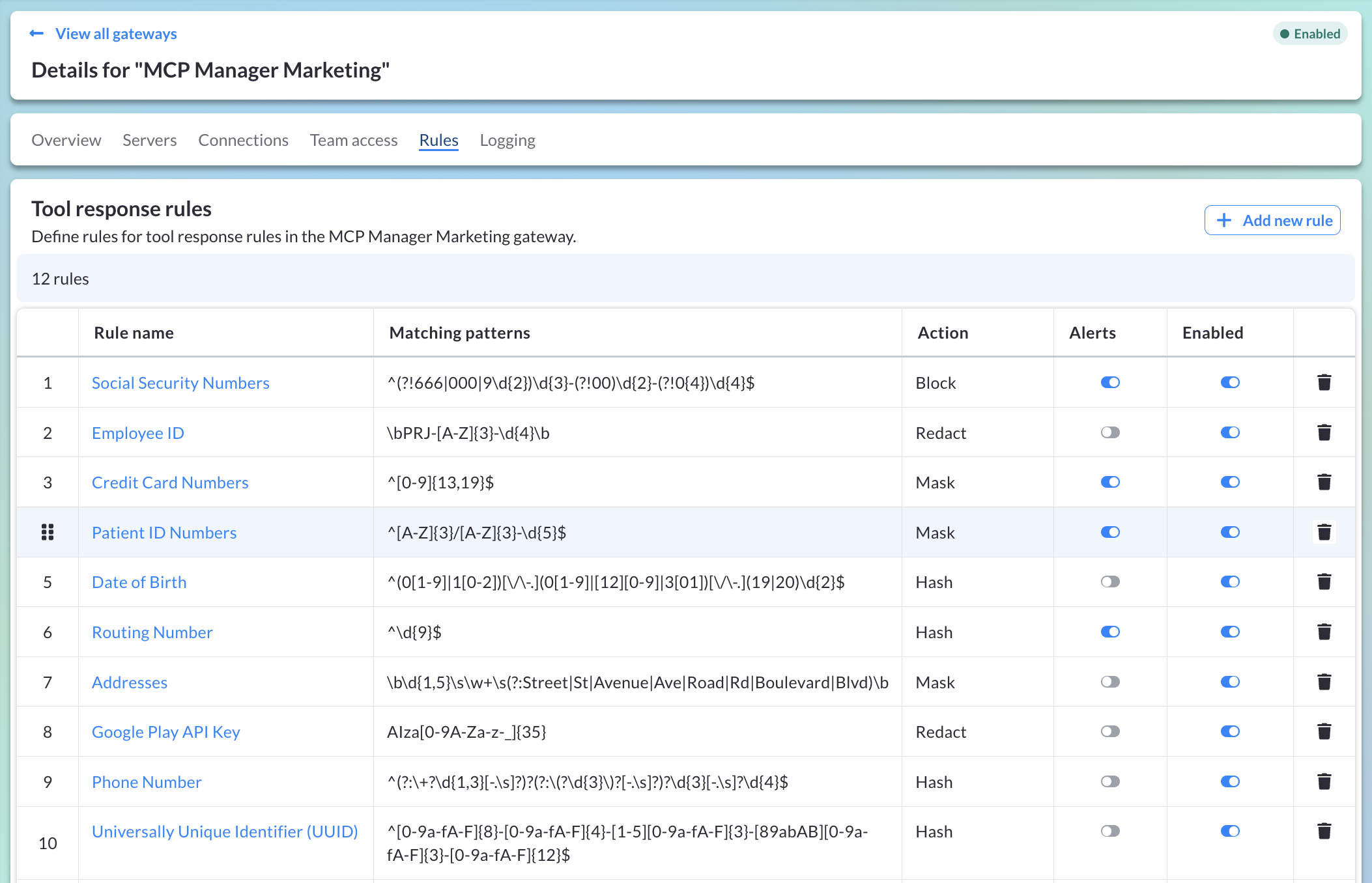
MCP Manager also provides comprehensive guardrails to protect personal and sensitive data from exfiltration and unauthorized access, see examples of some specific data protection rules below:
Distinctive Features and Capabilities of MCP Manager Include:
- Configurable rules to protect personal/sensitive data from unauthorized access or exfiltration, including integrations with tools like Microsoft Presidio
- MCP tool metadata locking with automatic change detection and blocking
- Coverage of all MCP deployment styles, including local MCP servers
- Enforcement of unique identities and granular RABC for all users and agents
- Automated authorization token rotation
- End-to-end, verbose logging of all MCP traffic
- Comprehensive reports, dashboards, and configurable alerting
- SAML SSO integrations and SCIM support
Full list of MCP Manager features
How MCP Manager Delivers ROI
The ROI organizations can expect from implementing MCP Manager falls into four areas:
- Reducing MCP server deployment costs
- Reducing LLM usage fees
- Preventing/reducing costs from security threats and sensitive data exposure
- Enhancing AI initiatives to increase their success rates and productivity benefits
Cost Saving Units Used In Our Calculations:
- ~7-10 hours ($754-$943)** Per Managed MCP Server Deployment
- LLM Usage Fee Savings: $1,530* Per Employee Per Year
- Preventing Data Breaches (dependent on scale and severity): Small-Medium Enterprises: $~$120,000-$1.4m Large Enterprises: Average of $4.4m.
- Enhancing AI Initiatives: N/A – Highly variable and dependent on the specifics of each organization and their AI deployment.
*Based on an employee making 17 queries per day to an LLM connected to ten MCP servers with fifteen tools-per-server. More details here.
**Costs and savings based on number of hours of engineering work required – with an indicative engineer salary of $175,000. More details here).
Illustrative Examples of ROI By Organization Size
Here are ROI estimates for organizations of varying sizes usage levels. The figures below assume that employees using MCP servers use an average of ten servers, with fifteen tools per server.
The figures below also assume the following server deployment type split across the organization:
- Remote: 50% of servers
- Workstation (also known as “Local”): 10% of servers
- Managed: 40% of servers
Small Organization (50 Employees – Assuming 15 Employees Using MCP Servers)
Total Estimated Year 1 Savings: $68,190 – $79,530 ($188,190 – $199,530 if costs of a potential data breach are included).
Breakdown
- LLM Usage Fees Annual Saving: $22,950 ($1,530 per user per year)
- Total Saved Labor Cost For Setup of 60 Managed MCP Servers: $45,240 – $56,580
- Prevented Costs of Data Breaches: ~$120,000
Mid Size Organization (250 Employees – Assuming 75 Employees Using MCP Servers)
Total Estimated Year 1 Savings: $340,950 – $397,650 ($1.2m-$1.4m if costs of a potential data breach are included).
Breakdown
- LLM Usage Fees Annual Saving: $114,750 ($1,530 per user per year)
- Total Saved Labor Cost For Setup of 60 Managed MCP Servers: $226,200 – $282,900
- Prevented Costs of Data Breaches: ~$950,000
Large Organization (1000 Employees – Assuming 300 Employees Using MCP Servers)
Total Estimated Year 1 Savings: $1.4m – $1.6m ($3.4m-$3.6m if costs of a potential data breach are included).
Breakdown
- LLM Usage Fees Annual Saving: $459,000 ($1,530 per user per year)
- Total Saved Labor Cost For Setup of 1200 Managed MCP Servers: $904,800 – $1.1m
- Prevented Costs of Data Breaches: ~$2m
MCP Manager ROI – Detailed Breakdown
The table below summarizes each ROI area and the potential ROI for each. Below the table there is a more detailed explanation of each ROI area.
| ROI Factor | Explanation | Estimated ROI |
| Reduced MCP Deployment Costs | Deploying MCP servers at scale is extremely time-consuming and costly. It requires teams of experienced engineers with specialist knowledge. MCP Manager eliminates these costs with pre-built solutions to deploy MCP servers and ecosystems at scale, securely, reliably, quickly, and easily. | Approximate savings of: $754-$943 per Managed MCP server deployment* *Based on a $95.11 cost-per-hour estimate for engineering work to deploy MCP servers of each type (more details). |
| Reduced Likelihood of Security Breaches (Particularly Sensitive Data Exfiltration) | The MCP-based attack surface is vast, and attacks can escalate far more rapidly than conventional hacks. MCP Manager provides comprehensive protection against these attacks, reducing the likelihood of data exfiltration and the associated legal, remediation, ransom, reputation, and other costly outcomes. | Losses avoided are dependent on the size of the organization and severity of the data breach. ~$120,000-$1.4m for small businesses** Average of $4.4m for large enterprises*** |
| Reduced LLM Usage Fees | By default, MCP clients load the metadata of all tools in connected MCP servers, which consumes chargeable tokens and operating context. MCP Manager refines which MCP servers and tools are exposed to LLMs based on the user identity used. This reduces the number of chargeable LLM tokens that are used each time a new query/task is submitted to an MCP-connected LLM. | Up to a 90% reduction in token usage per LLM-MCP query (compared to default MCP tool discovery). Illustrative saving: ~$153,000 per annum. Based on 100 users each making 17 queries a day via LLMs connected to ten MCP servers, each with fifteen tools – (more details). |
| Enhancing AI Initiatives | MCP servers are essential to AI-based productivity gains, but one factor that leads MCP and AI initiatives to fail is the inability to deploy, scale, and secure them. MCP Manager gives organizations the infrastructure, capabilities, and confidence to move forward successfully with their AI initiatives, delivering ROI faster and with less risk. | Highly variable and dependent upon the specifics of your organization and the nature of its AI initiatives. |
**Verizon’s Data Breach Investigations Report (2025)
***IBM’s Cost of a Data Breach Report (2025)
Each constituent factor that makes up the total potential ROI of MCP Manager is explored in more detail below.
ROI Factor 1: Reduced MCP Server Deployment Costs
Deploying MCP servers at scale is time-consuming and difficult. This is particularly true for Managed deployments (those which are hosted on the organization’s own infrastructure).
Cost Savings
If we assume an average hour of engineering work costs $95.11 (based on a salary of $175,000 divided by 1840 working hours per annum), then using MCP Manager can save an organization ~$754-$943 per Managed MCP server deployment
Based on our experience of secure MCP server setup, here are some estimates of how much time it takes to deploy a single, secure Managed MCP server, using the example cost of an average hour of engineering work above:
| Deployment Type | Setup Time Without MCP Manager | Setup Time With MCP Manager | Time Saved Per Server Deployed With MCP Manager | Cost Saved Per Server Deployed With MCP Manager | Time Saved using MCP Manager to Deploy 10 Servers | Cost Saved To Deploy 10 Servers With MCP Manager |
| Single Managed Server (Shared or Dedicated) | 8-10 hours | 5 minutes | ~475 -595 minutes | ~$754-$943 | ~79-99 hours | ~$7530-$9428 |
Building the infrastructure for secure, scaled Managed MCP server deployments requires investment in experienced engineering teams with highly specialized knowledge. It creates a cost center that includes significant initial costs and ongoing overheads to support users and manage their access.
MCP Manager enables users to quickly, easily, and securely deploy MCP servers at scale without any significant resource investment. It also enables administrative users to quickly and easily:
- Monitor the organization’s MCP ecosystem’s health, usage, and security
- Securely provision servers to teams and users
- Whitelist or block servers and features
- Control access at a user/team level
- Add/remove users with immediate effect.
ROI Factor 2: Reduced LLM Usage Fees
When LLMs and agents connect to MCP servers via MCP Manager, itpresents them with a curated, refined set of tools for the LLM to choose from, enabling them to work more efficiently and effectively, with reduced token consumption.
LLMs, such as Claude, ChatGPT, Perplexity, and others, use “tokens” as their primary pricing mechanism. A token is a small chunk of text (word fragment, character, or full word) that the model analyzes when processing prompts and generating responses.
When left unmoderated, MCP traffic consumes LLM tokens at an alarming rate. Even before the LLM starts using any server or tool, it must “read” the tool’s description and other metadata to understand what the tool does. Each tool name, description, and other preliminary details, from every connected MCP server, requires token usage for the LLM to process.
Calculating Average Token & Dollar Cost Per Tool Load
The number of LLM tokens required to process tool metadata can vary significantly from tool to tool, depending on the amount and complexity of the information contained in the metadata. Well-documented tools can use between 200 and 500 tokens just for the description field.
Servers with a large toolset generate significant token consumption, for example:
- GitHub MCP Server (20 tools) = ~5,000 tokens (average of ~250 tokens per tool)
- File System MCP Server (15 tools) = ~4,000 tokens (average of ~267 tokens per tool)
- Database MCP Server (25 tools) = ~7,000 tokens (average of ~280 tokens per tool)
- Slack MCP Server (12 tools) = ~3,500 tokens (average of ~292 tokens per tool)
- Memory/Context MCP Server (18 tools) = ~5,500 tokens (average of ~306 tokens per tool)
If we assume a conservative average processing cost of 300 tokens for each tool’s metadata, then querying an LLM that is connected to ten MCP servers, with fifteen tools per server, would consume ~45,000 tokens to load the tool metadata.
At this rate, 100 people, making 17 queries via an MCP-connected LLM per day, would cost ~$612 in LLM tokens per day (based on the current average LLM token cost of $8 per 1 million tokens). This is before the user or LLM has begun doing anything productive.
This is equal to $1,530 per user per year (excluding US public holidays), or $153,000 per year using the 100-user example above.
How MCP Manager Reduces Token Consumption
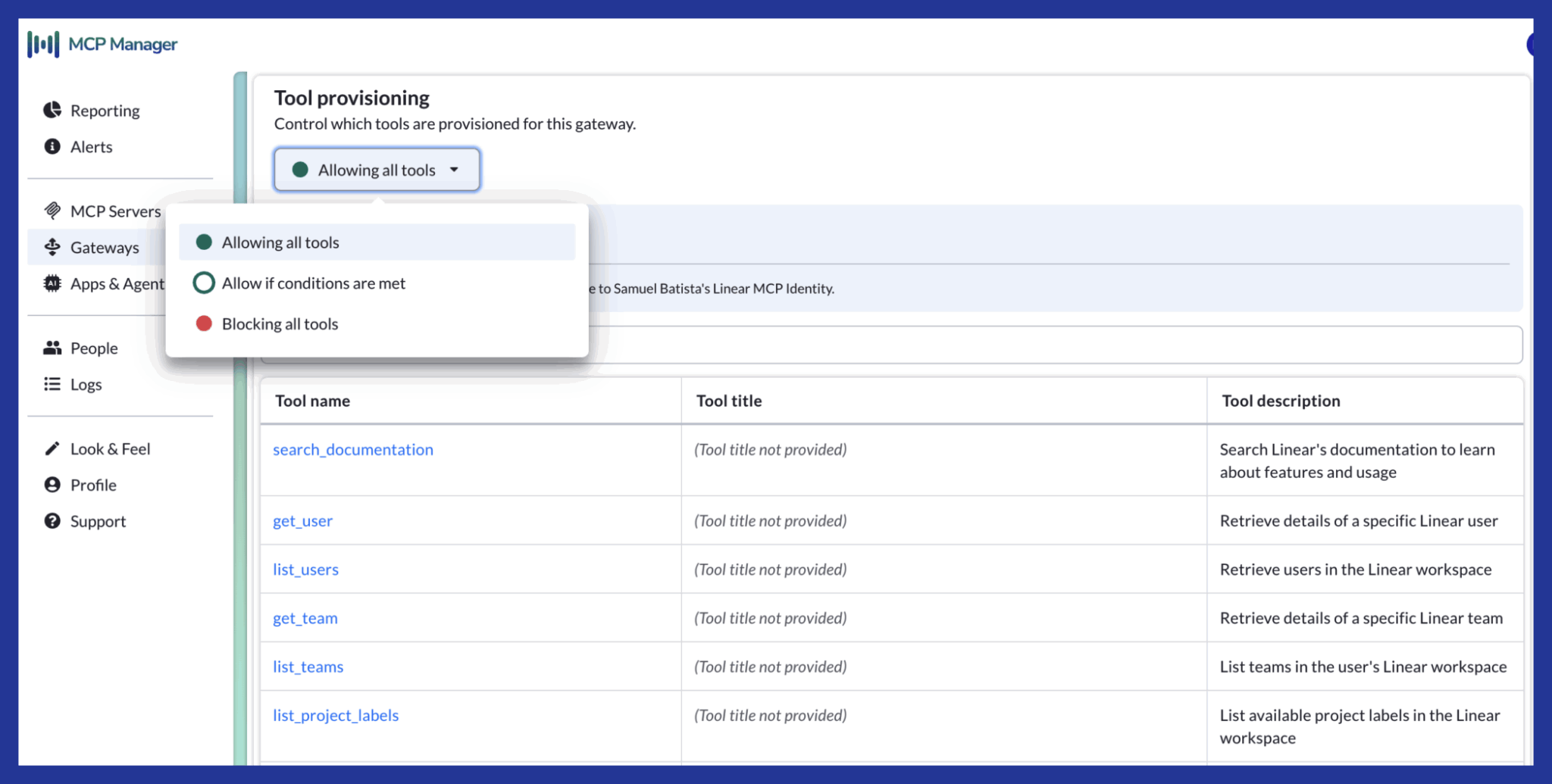
When you create gateways in MCP Manager you proactively select which servers and tools are exposed to specific teams or users.
MCP Manager gateways expose a refined pool of servers and tools to connecting MCP Clients. This greatly reduces the number of tool descriptions and other metadata which the LLM needs to process when it is selecting tools to complete any task. This reduced processing burden reduces the amount of tokens consumed.
MCP Manager’s reporting module also provides real-time visibility of where token usage is particularly high, by user, server, or tool, enabling teams to address any overconsumption and ensure efficient use of tokens and context.
How MCP Manager Improves Agent Performance
In addition, because MCP Manager refines which servers and tools are exposed to clients, it prevents the LLM’s context from being swamped by tool metadata. “Context bloat” is a common problem in MCP server use at scale. When LLMs receive too much tool metadata, they:
- Can fail to select tools
- Make poor tool choices
- Fail to execute tasks
- Execute tasks much more poorly and with more errors
MCP Manager gives LLMs a refined selection of servers and tools, enabling them to work more efficiently and effectively. This improved performance can compound and greatly improve your AI initiatives’ results and ROI.
Protection Against Security Risks
Using MCP servers introduces a vast and novel attack surface. Without a platform such as MCP Manager, you cannot mitigate the majority of MCP-based attacks.
Using MCP Manager drastically reduces the likelihood of:
- Legal costs due to sensitive data exposure
- Legal costs due to compliance violations
- Costs of remediating an attack
- Costs paid in the case of a data ransom/similar ransomware attacks
- Costs/time spent implementing “in-house” security protections
- Costs of paused AI initiatives due to security concerns
Without MCP Manager or a similar solution, any organization using MCP servers is operating with a high risk of MCP-based attacks, which can lead to any or all of the above costs being incurred.
Data Breaches – Estimating The Costs
Sensitive data is a common target of MCP-based attacks because MCP servers enable attacker-compromised LLMs to access company systems and databases containing sensitive data and exfiltrate this sensitive data to the attacker.
IBM’s Cost of a Data Breach Report 2025 estimates the global average cost of a data breach at $4.4m. This is a 9% decrease from 2024, which the authors attribute to faster identification and containment.
Meanwhile, Verizon’s 2025 Data Breach Investigations Report estimates the cost of a data breach for small businesses is in the range of $120,000 – $1.24m, depending on the severity of the breach.
It’s worth noting that attacks via your AI and MCP servers are extremely difficult to detect and diagnose when compared with more conventional attack surfaces. Platforms like MCP Manager:
- Provide guardrails to mitigate security risks
- Control user/agent access to data and other resources
- Reliably prevent sensitive data exfiltration
- Provide end-to-end audit logs and real-time alerting
Enhancing AI Initiatives
One of the reasons AI pilots fail or falter is that organizations are unable to implement, scale, and secure MCP servers to connect LLMs to the applications, systems, databases, and other resources they need to deliver real value.
Without MCP servers, the impact LLMs can have is greatly diminished. Without a platform like MCP Manager, organizations cannot deploy MCP servers at scale or securely.
MCP Manager improves the success rate and returns of organizations’ AI pilots by:
- Streamlining AI agent workflows via MCP server and tool orchestration
- Speeding up MCP server deployment and distribution across teams
- Improving agent performance through context optimization and tool orchestration
- Mitigating security risks that could prevent, delay, or pause AI pilots
- Providing reporting to track, evidence, and improve AI adoption
Your Next Step – Try MCP Manager
MCP Manager allows organizations to adopt MCP servers securely and efficiently at scale. MCP Manager provides comprehensive protection against MCP-based security threats and end-to-end observability of all MCP traffic.
Unlike other MCP security solutions, MCP Manager comes equipped with deployment capabilities. These deployment capabilities enable you to rapidly deploy MCP servers in formats that are suitable for scaled organizational use and provision them to your teams.
MCP Manager is more than your MCP gateway; it’s your unified platform for deploying, managing, monitoring, and securing your MCP ecosystem, enabling you to realize greater ROI sooner from your AI initiatives.
See how easy it is to deploy and use MCP servers using MCP Manager – try it for free now: