PII Redaction for MCP Servers: 2 Methods to Block Sensitive Data




Here’s a nightmare scenario to imagine: your MCP server just sent a customer’s social security number to Claude. And by the time you realize it, the damage is done because once PII hits a model, exposure is irreversible.
MCP servers unlock powerful agentic workflows by connecting AI models to your company’s tools and data. But without proper controls, they can easily and systematically expose PII that your customers and colleagues trusted you with. Every database query, every CRM lookup, every file read could leak sensitive information that you’d never wittingly expose externally.
With privacy regulations tightening and consumer scrutiny at an all-time high, data loss prevention (DLP) for MCP isn’t optional anymore. If you’re running MCP servers without a gateway, you have zero visibility into what data is flowing to models and zero ability to stop it.
This guide shows you how to block sensitive PII before it ever reaches your AI agents.
How MCP Gateways Stop PII Before It Reaches Models
MCP gateways sit between your servers and AI clients (like Claude or ChatGPT), acting as a checkpoint for every piece of data that flows through. This architectural position gives them three critical advantages:
1. Pre-model inspection: Gateways analyze content before it reaches the model, not after. Once data hits an LLM, it’s already exposed.
2. Intelligent mutation: Instead of blocking workflows entirely, gateways can redact, hash, or mask sensitive data, allowing work to continue while keeping PII out of models.
3. Centralized enforcement: Rather than relying on each individual server to implement its own filtering, the gateway enforces DLP policies consistently across all your MCP connections.
This centralized layer not only prevents MCP security risks, stops shadow MCP, and allows IT teams to set policies that govern MCP use; they also inspect the contents that a server wants to send to an MCP client and render a decision about whether this content contains sensitive information that should never hit a model.
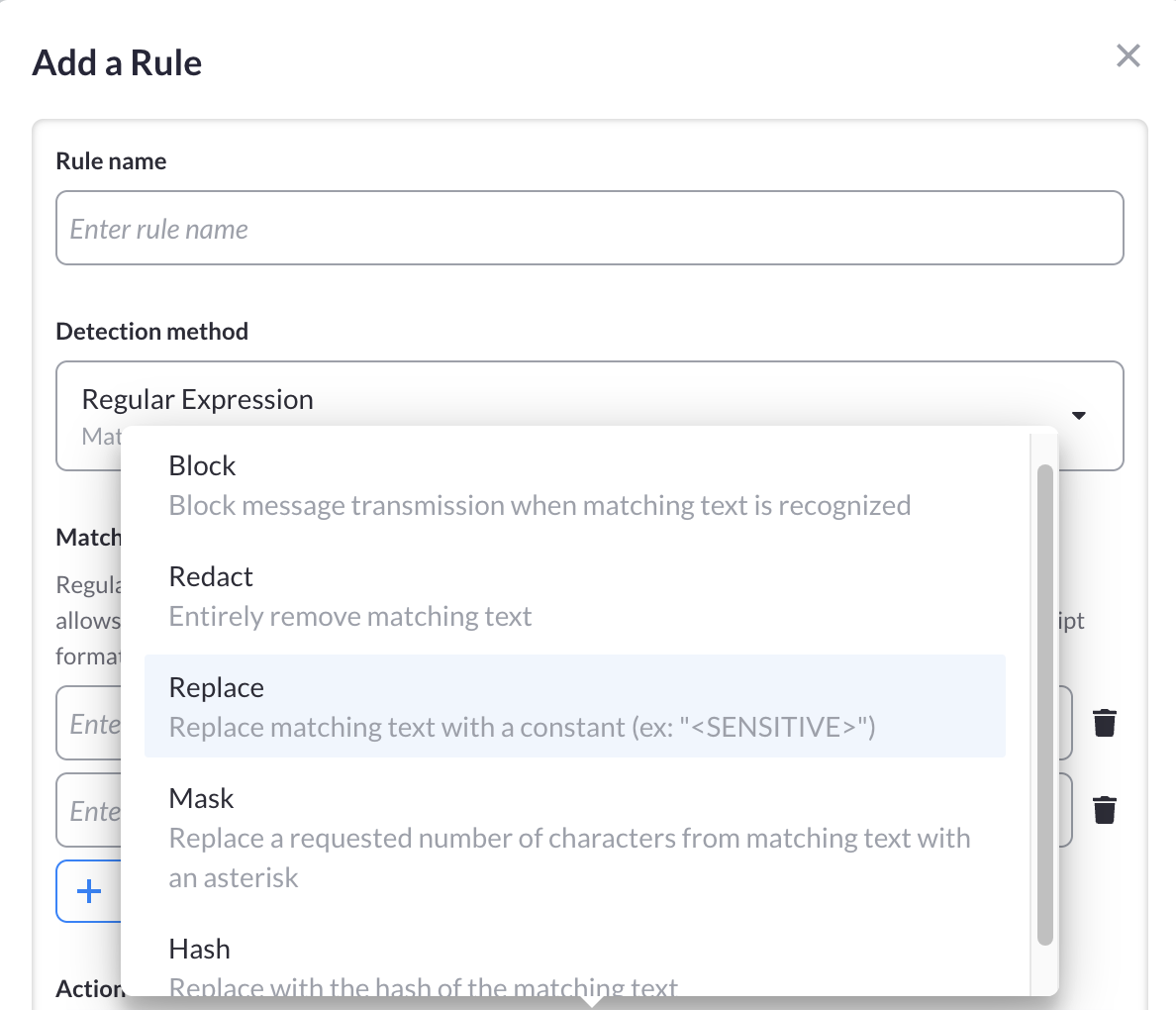
Example of MCP Redaction Rule Setup:
Three Tiers of PII Detection
MCP Manager’s gateway offers multiple detection methods, each suited for different types of sensitive data:
- Regex-Based Filtering: Pattern matching for structured data like SSNs, phone numbers, and API keys
- Microsoft Presidio Integration: NLP-based detection for unstructured PII like names, addresses, and financial data
- Custom DLP Endpoints: Integration with your existing DLP tools (Amazon Bedrock, first-party guardrails, enterprise DLP systems)
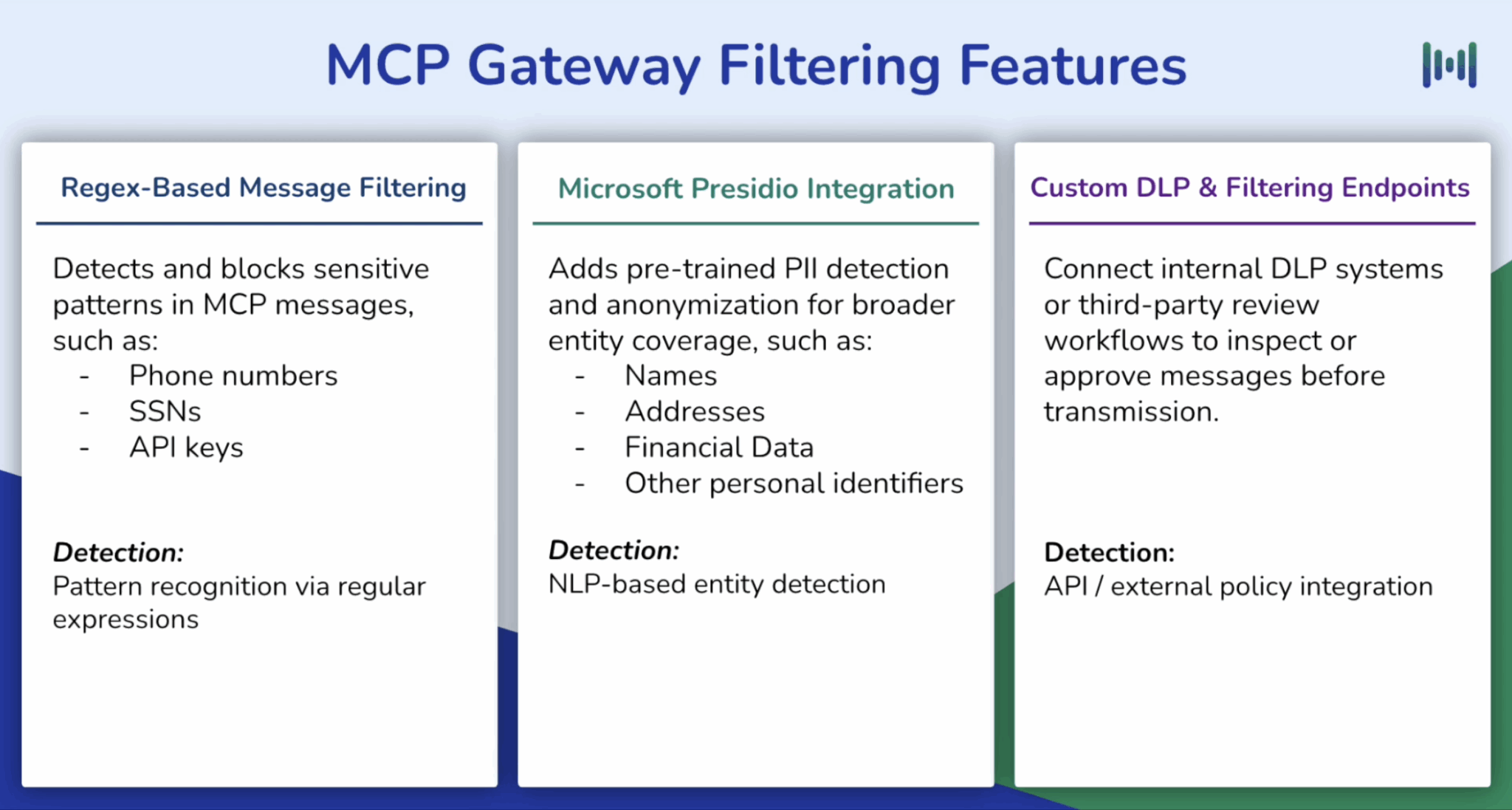
In the sections below, we’ll walk through the first two methods, both of which are available in MCP Manager’s free 2-week trial. If you need custom DLP & filtering endpoints, you can talk to one of our team members. We support first-party guardrails that teams developed, Amazon’s Bedrock, or DLP engines teams already use.
MCP Gateway 101
If you are unfamiliar with MCP gateways, the video below goes over how easy it is to govern and secure business data using MCP Manager.
But essentially, MCP gateways offer a centralized layer that helps teams deploy, monitor, and govern MCP servers without needing in-house AI infrastructure expertise.
MCP Manager is one such gateway. Our platform sits between an organization’s MCP servers and clients, capturing, mediating, and moderating all messages sent in botched directions.
This central control plane enables runtime policy enforcement, identity-aware access controls, and comprehensive audit logging. It also allows admins to provision teams with curated tool sets built from approved MCP servers and custom gateways created in MCP Manager.
Regex-Based Filtering: Block Data That Follows Patterns
If your sensitive data has a predictable format, regex-based filtering gives you instant, surgical protection. Think social security numbers, phone numbers, API keys, credit cards or anything that follows consistent patterns.
How Pattern Matching Works
Regex filters scan MCP messages for specific character sequences. When you define a pattern like ###-##-#### for social security numbers, the gateway detects any text matching that structure and takes action before the message reaches the model.
Common patterns teams protect:
- Social Security Numbers – ###-##-####
- Phone Numbers – (###) ###-#### or ###-###-####
- API Keys – Alphanumeric strings with specific prefixes (e.g., sk_live_…)
- Credit Cards – 16-digit sequences with optional spacing
- Internal IDs – Custom formats like PROJ-##### or EMP###
Five Ways to Handle Detected Patterns
Once the gateway identifies matching text, you choose how to respond:
| Action | What Happens | Example |
| Block | Stop message transmission entirely | Message never reaches the model |
| Redact | Remove matching text completely | SSN: 123-45-6789 → SSN: |
| Replace | Swap with placeholder text | SSN: 123-45-6789 → SSN: [REDACTED] |
| Mask | Hide characters with asterisks | SSN: 123-45-6789 → SSN: ***-**-*** |
| Hash | Replace with consistent identifier | SSN: 123-45-6789 → SSN: a3f9d8c1 |
Hashing is particularly powerful because it preserves workflow continuity. In other words, your agent can still reference “SSN a3f9d8c1” without ever knowing the real number.
When to Use Regex (And When You Need Something Else)
Regex is great with:
- Structured, formatted data
- Known patterns you can define in advance
- High-volume filtering with minimal performance overhead
Regex struggles with:
- Names, addresses, and freeform text
- Data formats that vary by region or context
- PII that requires understanding meaning, not just structure
For those cases, you’ll want NLP-based detection like Presidio (covered in the next section).
See Regex Filtering in Action
Watch this 7-minute demo to see how to set up regex-based filters in MCP Manager.
NLP-Based Detection: Catch PII That Has No Fixed Pattern
Regex filters stop structured data like 123-45-6789. But what about:
- “Sarah Johnson lives at 742 Evergreen Terrace”
- “Patient MRN: CA-2847-JX”
- “Driver’s license D1234567 (California)” vs “123-456-789 (New York)”
These contain obvious PII, but there’s no single pattern to match. Names vary infinitely. Addresses have countless formats. Medical record numbers differ by institution. Driver’s licenses use different structures in every state.
That’s where NLP-based detection comes in.
Microsoft Presidio: Context-Aware PII Recognition
MCP Manager integrates with Microsoft Presidio, an open-source tool that uses Natural Language Processing (NLP) to understand meaning, not just patterns. Instead of looking for ###-##-####, Presidio analyzes text like a human would, recognizing that “Sarah Johnson” is a person’s name based on context, capitalization, and linguistic structure.
What Presidio detects that regex can’t:
- Personal names: First, middle, last names in any order
- Locations: Addresses, cities, regions (even abbreviated)
- Medical identifiers: Patient IDs, medical record numbers, health plan IDs
- Financial data: IBAN codes, credit card numbers with varied spacing
- Government IDs: Driver’s licenses, passport numbers (multi-regional formats)
- Dates of birth: Written as “March 15, 1985” or “03/15/85”
Fine-Tuned Control Over Detection
MCP Manager’s Presidio integration gives you precise configuration options:
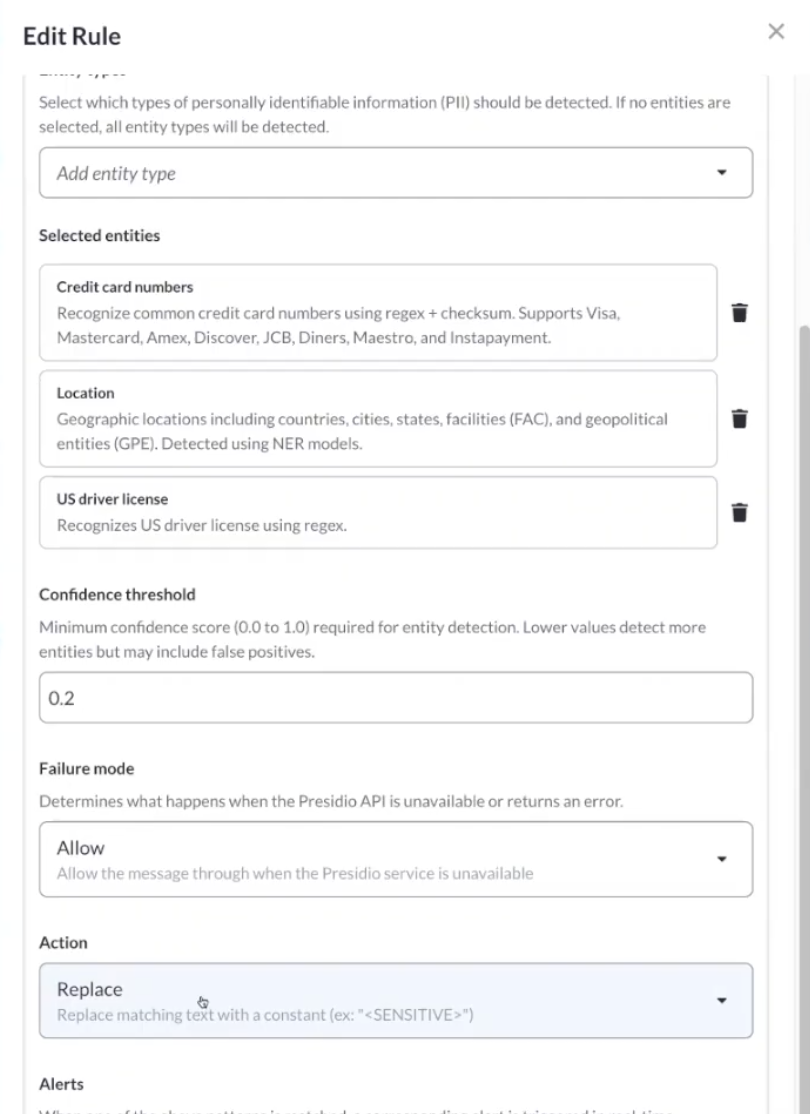
- Select specific entities: Choose exactly which PII types to scan for (e.g., US driver’s licenses + locations, but not phone numbers)
- Set confidence thresholds: Presidio assigns each detection a confidence score (0-100%). You decide the cutoff. For highly sensitive data, set a low threshold (block even 60% confidence matches). For general use, require 85%+ confidence to reduce false positives.
- Configure failure modes – If Presidio encounters an error or timeout, choose whether to fail open (allow message through) or fail closed (block transmission). Critical compliance scenarios should fail closed.
- Choose actions – Just like regex filters, you can block messages entirely or replace detected PII with [REDACTED] placeholders.
NLP-Based Filtering in MCP Manager:
Combining Regex and Presidio for Complete Coverage
The most effective approach uses both methods:
- Regex for high-speed pattern matching of known formats (SSNs, API keys, phone numbers)
- Presidio for contextual understanding of unstructured PII (names, addresses, medical data)
Together, they create layered protection—regex catches the obvious structured data instantly, while Presidio analyzes deeper semantic content.
Watch Presidio & MPP Server Configuration in Action
This walkthrough demonstrates how to enable Presidio in MCP Manager, select entity types, adjust confidence thresholds, and test detection against sample text before going live:
You’ll see how Presidio identifies PII that would slip right through Regex filters.
Protect Customer and Business Data Before It’s Too Late
The cost of a PII leak isn’t hypothetical. GDPR fines reach €20 million or 4% of global revenue. HIPAA violations start at $100 per record. But the real damage is harder to quantify—customers who lose trust don’t come back, and “the company that leaked my data to an AI” isn’t a headline any brand wants.
MCP servers give your AI agents powerful capabilities, but without proper controls, they become data exposure engines. Every customer record, medical file, or financial document your agents access creates an opportunity for irreversible leakage.
The good news? You can stop this before it starts.
Your Two-Layer Defense:
- Regex-based filtering blocks structured data (SSNs, API keys, phone numbers) instantly with pattern matching.
- Presidio’s NLP detection catches contextual PII (names, addresses, medical IDs) that doesn’t follow fixed patterns.
Together, they ensure sensitive data never reaches your models, while still letting your agents do their work through redaction, masking, and hashing.
Get Started in Under 15 Minutes
MCP Manager’s gateway includes both regex and Presidio filtering in a free 2-week trial. No credit card required.
In 15 minutes, you can:
- Configure regex patterns for your most sensitive data types
- Enable Presidio detection for contextual PII
- Test filters against real MCP traffic before enforcing them
If you need custom DLP integration with your existing security tools, you can schedule a call with our team to discuss custom options.
Don’t wait until a leak forces your hand. Protect your customers’ data today.