Managed MCP Servers: The Alternative to Local Servers




As organizations race to integrate AI capabilities into their workflows, Model Context Protocol (MCP) servers have emerged as a critical infrastructure component. However, deploying and managing these servers at scale presents significant challenges for IT and engineering teams. Enter the managed MCP server, a solution we created for teams that want to make local MCP servers more secure and more scalable.
What Is a Managed MCP Server?
A managed MCP server is essentially a local MCP server deployed like a remote server and managed by a third-party provider. Rather than running MCP servers on individual user machines, organizations can leverage remotely hosted instances that maintain a lot of the functionality of local servers while offering centralized management and secure connections.
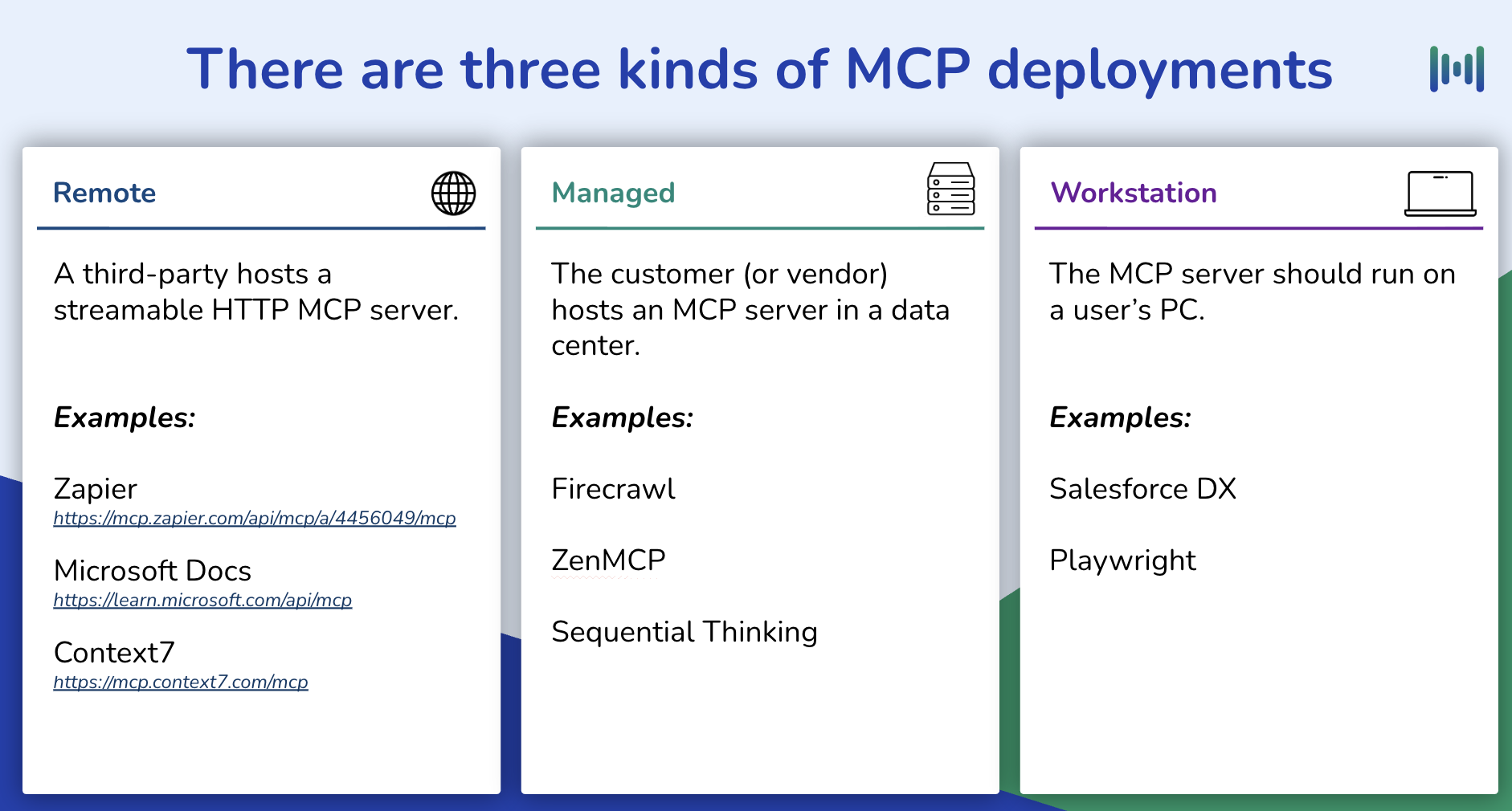
With managed MCP servers, you get a lot of the capabilities of a local (or workstation) server without the operational overhead of deploying and maintaining it across your organization. Managed servers are one of three types of MCP server deployments.
Use Case Considerations
Managed MCP servers work well for the vast majority of use cases, particularly those requiring only API keys or remote service connections. For example, servers like Firecrawl that need only an API key and don’t require access to local user files are ideal candidates. Once deployed, multiple users can connect securely through an MCP gateway.
Not all MCP use cases work for managed server deployments. MCP servers that require direct access to files on a user’s local machine may not be suitable for managed deployment, though we are working on alternative solutions for these use cases.
Key Benefits of Managed MCP Servers
Always-On Availability
Unlike local deployments that depend on individual machines being powered on, managed MCP servers are deployed remotely and accessible via a specific URL. This ensures consistent availability for users and applications, regardless of individual device status.
Multi-User Access
One of the most compelling advantages is enabling multiple users to connect to the same MCP server instance. This is particularly valuable for services integrated with platforms like Notion or Slack, where teams need shared access to common resources.
Enhanced Security Posture
Managed MCP servers significantly reduce security risks by centralizing credential management. Instead of distributing API keys and credentials across numerous individual machines—each representing a potential attack surface—organizations can maintain a single, secured MCP deployment. Local servers, by their nature, have access to a user’s entire machine, creating broader vulnerability exposure.
Overcoming Technical Challenges
Deploying managed MCP servers comes with two primary challenges: dependency provisioning and security implementation.
Dependency Management
Remote servers need all required dependencies provisioned correctly. MCP Manager handles managed MCP servers through containerization using Docker, which allows multiple MCP instances to run in isolated, sandboxed environments. This approach ensures clean, reproducible deployments without dependency conflicts.
Security and Authentication
While local MCP servers typically lack authentication mechanisms, managed servers implement robust security through unique keys and tokens. The provider acts as a trusted middleman, validating access requests before routing them to the appropriate MCP server instance. Importantly, these servers are deployed on empty instances devoid of user data, minimizing potential data exposure.
The Value of an MCP Gateway in Production
Beyond basic hosting, MCP Manager’s managed server platform also includes MCP gateway functionality that addresses critical production requirements:
- Logging and Monitoring: Track errors, access frequency, and usage patterns across your MCP infrastructure
- Access Controls: Grant different permission levels to various user groups, controlling which tools are available for read or write operations
- Security Features: Detect personal information and potential prompt injections by running validation logic as data flows between MCP servers and clients
- Audit Capabilities: Maintain comprehensive logs for compliance and troubleshooting
These features resolve many of the challenges organizations face when attempting to run MCP in production environments, from tool-level permissions to provisioning and compliance requirements.
Cost Optimization Through Context Management
An often-overlooked benefit of managed MCP servers with gateway capabilities is cost reduction through context management. By exposing only the necessary tools to each user or application, organizations can:
- Reduce context length sent to AI models
- Lower API costs, as many model providers offer reduced pricing for shorter contexts
- Improve security by limiting available tools to only what each user needs
The ability to configure permissions through a user-friendly interface makes it simple to control context bloat while maintaining appropriate access levels across your organization.
Conclusion: Managed MCP Servers Help Scale and Secure MCP Deployments
Managed MCP servers represent a significant evolution in how organizations deploy and scale AI infrastructure. By centralizing deployment, enhancing security, enabling multi-user access, and providing production-ready features like monitoring and access controls, they solve the practical challenges that have hindered enterprise MCP adoption.
For IT and engineering teams looking to scale MCP deployments without the operational burden and security risks of local installations on every machine, managed MCP servers offer a compelling path forward.
Want to try MCP Manager for free? We’ll set you up with a 2-week free trial after your onboarding call, where we’ll help spin up the servers you need.