12 Best MCP Gateways for Engineering Teams (2026)




Engineering teams are the early adopters of MCP. They wire AI agents into production systems, evaluate which servers to run, figure out how to manage credentials, and eventually hand something off to IT that needs to actually hold up. The tooling you choose early shapes what’s possible (and what’s painful)later.
MCP gateways have emerged as the control layer between your agents and your tools. But the market is crowded and moving fast, and most options were built for a specific job: local development, API management, LLM routing, or enterprise governance. Picking the wrong one means rebuilding later.
This article breaks down the most relevant MCP gateway options for engineering teams — what each one is actually built for, and where each falls short.
Main Takeaways:
- What is an MCP Gateway? A control plane that sits between your AI agents and your MCP servers, centralizing authentication, access control, observability, and policy enforcement across all tool interactions.
- Why it matters for engineering: Without a gateway, every agent manages its own connections, credentials, and error handling for every tool. As your tool count grows, that sprawl becomes unmanageable — and breaks in production.
- How to choose: Your decision hinges on where you’re building. Local dev, cloud-native, regulated enterprise, and high-throughput production all have different answers.
- The governance question: Most engineering teams eventually hand MCP infrastructure to IT. Choosing a gateway that was built for governance from the start saves significant rework.
- The choice for teams deploying MCP at scale: MCP Manager by Usercentrics is purpose-built to give teams governance and control, making it the strongest choice for engineering teams building in environments where security and compliance matter.
- The top pick for compliance-first deployments: MintMCP is purpose-built for regulated environments, with SOC 2 Type II certification, enterprise SSO, granular audit logs, and high availability with automatic failover, making it the strongest fit for teams where compliance isn’t optional.”
- The top pick for open-source, self-hosted control: IBM Context Forge and Obot are the strongest options for teams that need full data control without vendor lock-in.
TL;DR: MCP gateways make it easier, safer, and more simple to run MCP in production.
What MCP Gateways Do for Engineering Teams
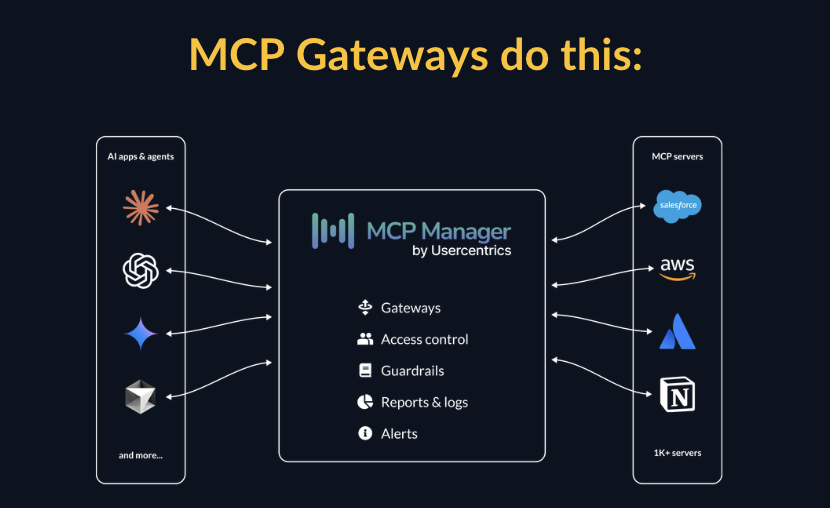
An MCP gateway sits between your agents and your MCP servers. It’s the control plane that handles:
- MCP registry: engineers can clearly see what servers are approved
- Authentication and authorization: verifying which agents and users can access which tools
- Routing: directing requests to the right MCP server
- Policy enforcement: blocking unsafe operations before they reach your tools
- Observability: logging every tool call with full context for debugging and compliance
- Server management: centrally provisioning and governing MCP servers at scale
- Tool permissions: decrease context bloat and increase safety
- PII masking & privacy: ensure sensitive data never hits models
Without a gateway, each agent handles all of this independently (or not at all). That means duplicated credential management, inconsistent access controls, no centralized audit trail, and no way for IT to see what’s happening across the organization. The gateway solves all of that.
The Integration Sprawl Problem: Why Gateways Matter at Scale
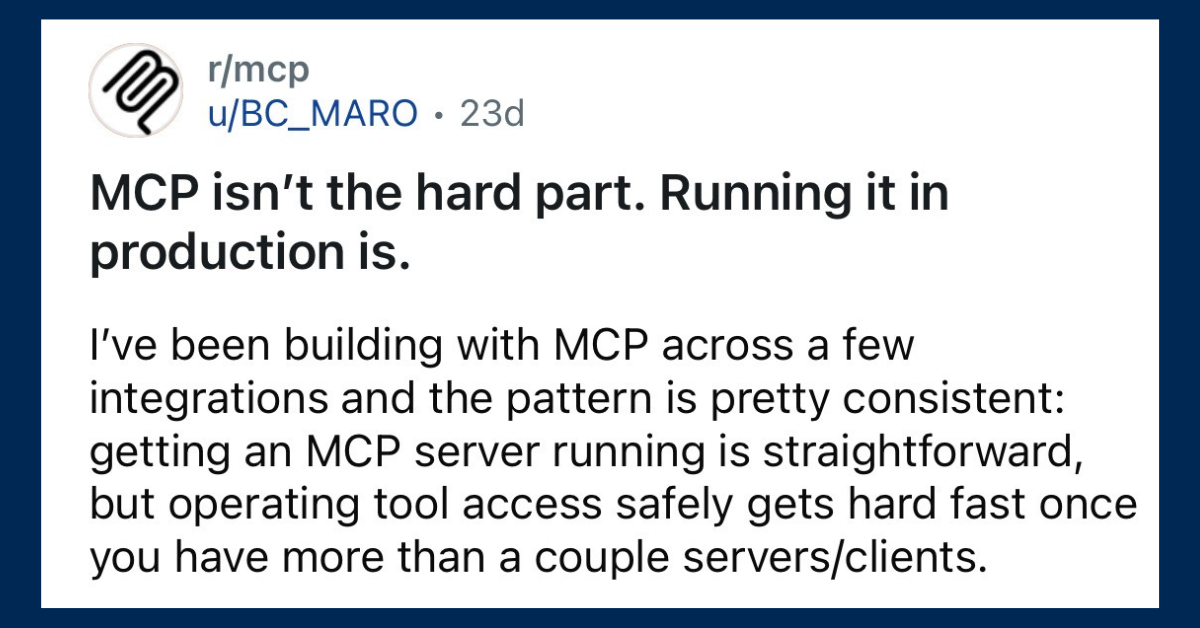
You needn’t look any further than Reddit to see the problem every engineering team hits when moving from prototype to production.
In a prototype, you have one agent and two tools. Each connection is manageable — you wire them up directly, handle credentials inline, and move on. Then you add more agents and more tools. Suddenly every agent is managing its own connections, its own credential storage, its own error handling, and its own access logic for every tool it touches.
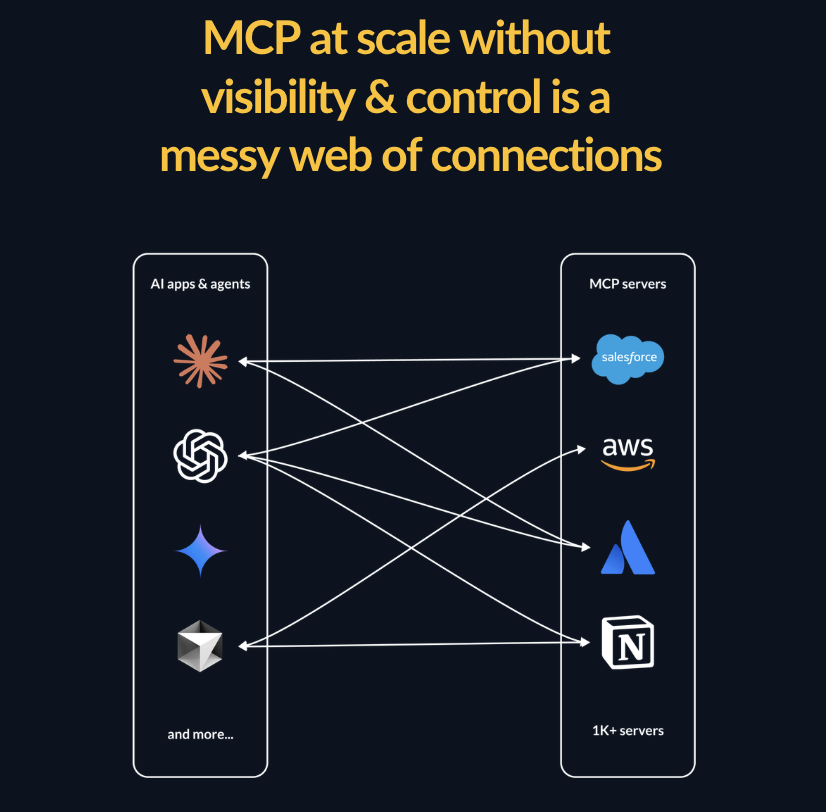
Add a new tool and you update every agent that needs it. Rotate a credential and you hunt down every place it’s referenced. Try to enforce a new access policy and you have no consistent place to do it. The system becomes brittle, and the maintenance burden grows with every addition.
A gateway collapses that sprawl to a single control point. Agents connect to the gateway. The gateway connects to tools. Add a tool once. Rotate credentials once. Enforce policy once.
This is the core architectural value of an MCP gateway. And it’s why teams that skip it in prototyping almost always add one before they ship.
Why Your Existing API Gateway Isn’t Enough
When IT hears “MCP gateway,” the first question is usually: “What about our existing API gateway?”
It’s a reasonable question. But MCP introduces a fundamentally different model than traditional APIs, and general-purpose API gateways weren’t built for it.
Here’s why traditional APIs and MCP are very different:
- Traditional APIs are stateless request-response. A client sends a request, a server responds. The gateway validates the request, routes it, and returns the response. Governance is straightforward.
- MCP doesn’t work in the same way. Agents using MCP are stateful, multi-turn, and action-oriented. They discover tools dynamically, chain tool calls across multiple servers, and take actions in the world (like writing records, triggering workflows, querying sensitive data stores) based on instructions that may themselves be the product of earlier tool calls.
The security and governance challenges that MCP creates are unique: prompt injection, tool poisoning, MCP rug pulls, PII leakage across chained tool calls. These MCP security risks don’t map neatly onto the threat model API gateways were built to address.
Kong, AWS API Gateway, and similar tools can sit in front of MCP traffic. They can handle authentication and routing. But they weren’t built to understand MCP semantics, detect AI-specific attack patterns, or enforce the kind of tool-level governance that production MCP deployments require. You can make them work, but you’re working against the grain of what they were designed to do.
How to Choose an MCP Gateway: Decision Framework
Before evaluating specific products, map your situation to the criteria that actually matter for your use case.
| Your situation | What matters most | Best fit |
|---|---|---|
| IT needs visibility and control | Governance, PII detection, audit trails, IT handoff | MCP Manager by Usercentrics |
| Already running Kong for API management | Platform consolidation, familiar tooling | Kong AI Gateway |
| Local development, individual developer | Fast setup, containerized, free | Docker MCP Gateway |
| Running AI workloads on AWS Bedrock | AWS-native, serverless, IAM integration | Amazon Bedrock AgentCore |
| Large org, multiple teams, federated governance | Federation, multi-deployment management | IBM Context Forge |
| Building agents in code, unified AI platform | Model + tool management in one place | TrueFoundry |
| High-throughput, latency-sensitive production | Sub-3ms performance, Go-native | Bifrost by Maxim AI |
| Need 500+ SaaS integrations fast | Connectivity breadth, managed integrations | Composio |
| Open-source, full data control | Self-hosted, no vendor lock-in | Obot or Docker |
What Engineering Teams Need from an MCP Gateway
The evaluation criteria for engineering teams tend to center on a few core things:
- Fast setup: minimal configuration to get agents talking to tools in development
- Flexibility: support for multiple MCP servers, clients, and deployment environments
- Performance: low latency overhead that doesn’t bottleneck agent workflows
- Observability: audit logs, along with visibility into tool calls, errors, agent behavior, and token use in production
- Access controls: the ability to scope what tools different agents or users can invoke
- Production readiness: something that holds up under real workloads, not just prototypes
- SSO and identity management: integration with enterprise IdPs like Okta, Entra, and Google via OAuth 2.1 and OIDC
- PII detection and masking: preventing sensitive data from reaching the LLM before it’s too late
- Secrets management: credential injection that keeps API keys and tokens away from agent code
- Immutable audit logs: end-to-end traceability per tool call for compliance and incident review
- SIEM integration: exporting telemetry to existing security tooling via OpenTelemetry or similar
- Threat protection: detection of prompt injection, tool poisoning, and MCP rug pulls at the gateway layer
With that framework in mind, here’s how the main options stack up.
MCP Manager by Usercentrics
Best for: Engineering teams building in regulated environments
MCP Manager is purpose-built for enterprise MCP governance, which makes it a strong choice for engineering teams building in environments where IT and security have a seat at the table. Rather than bolting on compliance later, MCP Manager ships with the controls that regulated industries require — meaning engineering doesn’t have to rebuild governance infrastructure once the project scales.
Key capabilities include:
- Private MCP registry with one-click installation across clients like Claude and Cursor
- Tool-level RBAC so teams can scope access at a granular level
- Runtime guardrails that enforce policy in real time, not just at setup
- PII detection for sensitive data moving between agents and MCP servers
- Dashboards and audit logs built for both engineering observability and compliance reporting
- Integrations with SSO, SIEM via OpenTelemetry, and AWS Bedrock
For engineering teams building in financial services, healthcare, insurance, or any regulated environment, MCP Manager removes a significant category of rework. The governance layer is already there — engineering doesn’t have to negotiate it with IT after the fact.
Kong AI Gateway
Best for: Engineering teams already deeply invested in Kong’s API infrastructure
Kong is a well-established name in API gateway infrastructure, and their AI Gateway product extends that foundation to support MCP. For organizations already running Kong to manage their API layer, the MCP support is a natural extension — same platform, same operational patterns, less net-new tooling to manage.
Kong’s strengths are its maturity, scale, and breadth. It’s built to handle complex routing across a large organization’s API surface, and the enterprise feature set reflects years of production hardening.
The limitation is also inherent to that history. Kong is fundamentally an API gateway that added MCP support, not an MCP-native platform. Teams not already in the Kong ecosystem will find it significant overhead to adopt for MCP specifically. And for teams evaluating MCP governance as a standalone need rather than an extension of existing API infrastructure, there are more purpose-built options.
Docker MCP Gateway
Best for: Individual developers running MCP servers locally
Docker’s MCP Gateway is open source and ships as part of Docker Desktop’s MCP Toolkit. It solves a real problem: MCP servers are just programs that need to run somewhere, and running them directly on a developer’s machine means dealing with installation, dependencies, updates, and security risks.
Docker’s solution is elegant — run MCP servers as isolated containers, managed by a local gateway. The gateway handles server lifecycle, credential injection, and routing. Servers run with restricted privileges and network access by default, and it integrates naturally into a Docker-native workflow.
For a developer getting started with MCP locally, Docker’s gateway is a reasonable choice. It’s free, containerized, and familiar.
Where it falls short is the transition from local to production. There’s no centralized dashboard, no organization-wide RBAC, and no compliance-grade audit logging. It’s a local dev tool — well-designed for that job, but not an enterprise control plane. Teams that start here often find themselves needing to migrate once IT gets involved.
Amazon Bedrock AgentCore Gateway
Best for: Engineering teams running AI workloads on AWS
Amazon Bedrock AgentCore is not a standalone MCP gateway. Instead, it’s a fully managed AI infrastructure platform that includes MCP gateway functionality as part of a broader agent stack. For engineering teams already building on AWS Bedrock, that distinction matters less: the MCP access layer is there, it’s serverless, and it plugs into IAM, CloudWatch, and CloudTrail with minimal configuration. For teams evaluating a dedicated MCP gateway, it’s a different kind of decision.
Key features include:
- Zero-code MCP tool creation from existing REST APIs and Lambda functions
- OAuth-based inbound authentication supporting Cognito, Okta, Auth0, and custom providers
- IAM-based outbound authorization for backend resource access
- Semantic tool discovery so agents can find the right tool based on natural language intent
- Federation support enabling hierarchical tool organization across organizational boundaries
- Serverless infrastructure with no gateway maintenance overhead
The tradeoff is the scope of the commitment. AgentCore’s MCP capabilities aren’t something you drop into an existing stack — they come with the full Bedrock platform. Teams already invested in AWS will find that seamless. Multi-cloud or hybrid environments will face friction, and teams looking for broad SaaS connectivity outside the AWS ecosystem will find the tool selection limited. If you’re evaluating MCP gateways as standalone infrastructure, there are more purpose-built options on this list.
IBM MCP Context Forge
Best for: Large engineering organizations needing federated MCP governance
IBM’s open-source MCP gateway is designed for the complexity of large enterprise environments — multiple teams, multiple MCP deployments, and federated governance across business units. It’s the right tool when the problem isn’t just running a gateway, but running many of them coherently.
Key capabilities include:
- Federation across multiple MCP gateway deployments via mDNS auto-discovery
- Health monitoring and capability merging across federated gateways
- Flexible authentication including JWT bearer tokens, basic auth, and custom headers with AES encryption
- Multi-database support: PostgreSQL, MySQL, SQLite
- Virtual servers and retries for resilience
- Optional admin UI
The honest caveats: 100-300ms latency is meaningfully higher than other options on this list, and there’s no official commercial support. IBM Context Forge is open source, which means your team owns the operational burden. It’s well-suited for large engineering organizations with dedicated platform teams comfortable running complex open-source infrastructure — and not recommended for teams without that capacity.
TrueFoundry
Best for: Engineering teams building AI agents in code
TrueFoundry is a full AI and agent platform with MCP gateway functionality built in. It’s well-suited for engineering teams writing agents from scratch and wanting a unified platform for model access, deployment, and tooling — one control plane covering LLMs and MCP tools together.
The key caveat is that MCP support is still maturing in TrueFoundry. Teams that need robust, production-grade MCP governance today rather than on a future roadmap should verify current feature depth before committing. TrueFoundry also skews toward engineering builders rather than IT governance teams, so the feature set reflects that audience.
Pricing ranges from a free trial to $499 or $2,999/month for higher tiers, with enterprise pricing on request.
MintMCP
Best for: Compliance-aware teams
MintMCP is a commercial MCP gateway with a focus on fast deployment and compliance readiness. Its SOC 2 Type II certification makes it a viable option for teams in regulated industries that need to move quickly without spending months on compliance documentation.
The MintMCP gateway offers key features like one-click deployment, automatic OAuth wrapping, SSO support, real-time guardrails, and complete audit trails.
The tradeoff is latency. MintMCP’s deep inspection and compliance scanning adds 100-250ms overhead, which is acceptable for most enterprise workloads but worth factoring in for latency-sensitive applications.
Bifrost by Maxim AI
Best for: Engineering teams prioritizing raw performance
Bifrost is a high-performance MCP gateway built in Go, designed for developer velocity. It’s genuinely fast — sub-3ms latency — and has a solid developer experience with built-in observability tooling, Prometheus metrics, and OpenTelemetry distributed tracing. Cost tracking per tool call and a built-in real-time dashboard round out the observability picture.
For engineering teams where gateway latency is a real constraint — high-throughput agent workflows, latency-sensitive applications — Bifrost’s performance profile is differentiated. It also supports agent mode with configurable auto-approval for specific tools, and per-request tool filtering for granular control.
The tradeoff is governance depth. Bifrost is built for moving fast, which means enterprise-grade RBAC, PII detection, and compliance audit trails are limited compared to purpose-built governance solutions. It’s the right choice for engineering teams with minimal compliance requirements. It’s the wrong choice for teams that will eventually need to hand governance responsibilities to IT or a security team.
Obot
Best for: Engineering teams wanting open-source flexibility with an integrated agent platform
Obot is an open-source MCP gateway combined with a broader AI agent platform — useful for teams that want to manage gateway infrastructure and agent orchestration in one place rather than stitching together separate tools. It has an active development community and regular release cadence.
The tradeoffs are typical of open-source self-hosted solutions: governance and compliance features require more DIY configuration than commercial alternatives, and the operational burden sits with your team. Best for technically capable engineering teams comfortable running and maintaining open-source infrastructure, and less suitable for environments where IT needs out-of-the-box governance controls.
Lasso Security
Best for: Engineering teams with dedicated security requirements and advanced threat detection needs
Lasso takes a security-first approach to MCP, with real-time monitoring built specifically around AI attack vectors. Its plugin-based architecture provides threat detection, tool authorization with parameter validation, and network filtering for MCP destinations — protecting against credential theft, tool poisoning, and unauthorized data access.
For engineering teams building in security-sensitive environments who need active threat detection rather than just access controls, Lasso offers capabilities that most gateways don’t prioritize. The open-source core also gives teams full visibility into how detection works.
The tradeoff is that Lasso is optimized for security monitoring rather than broad enterprise governance. Teams that need PII detection, audit trails, and compliance-grade controls alongside threat detection may find they need to combine Lasso with additional tooling.
Composio
Best for: Engineering teams that need broad SaaS tool connectivity fast
Composio is an agentic integration platform that provides an MCP gateway as part of a much larger pre-built tool library. The core value proposition is breadth: 500+ managed integrations for popular SaaS applications like Slack, GitHub, Jira, and Salesforce, all accessible through a single unified endpoint.
For engineering teams that need to connect agents to a wide variety of tools quickly and don’t want to build or maintain individual MCP server integrations, Composio removes significant development overhead. OAuth management, tool discovery, and integration maintenance are handled by the platform.
The tradeoff is that Composio is built for connectivity breadth, not governance depth. RBAC, PII detection, compliance audit trails, and the kind of controls that satisfy an enterprise security review are not the product’s focus. Teams building in regulated environments or handing anything off to IT will likely find the governance layer insufficient.
Zapier
Best for: Non-technical teams — not a production engineering tool
Note: Zapier is not a dedicated MCP gateway. It’s an automation platform that has added MCP support, and it belongs on this list only so engineering teams understand what it is and isn’t.
Zapier’s MCP support allows AI clients like Claude to access Zapier-connected apps — Gmail, Slack, HubSpot, and 7,000+ others — through a single MCP endpoint. For non-technical teams already using Zapier extensively, it’s a practical way to extend AI agent capabilities without engineering involvement.
For production engineering use, it’s not the right tool. Zapier is an automation platform, not a gateway built for engineering workflows. Governance features, audit trails, access controls, and the kind of infrastructure engineering teams need in production are minimal. If a business team asks whether they can use Zapier for MCP, the answer is yes for lightweight use cases. If they ask whether it replaces a production MCP gateway, the answer is no.
How to Choose an MCP Gateway for Your Engineers
The right MCP gateway for an engineering team depends on where the project is headed, not just where it is today.
| Need | Best fit |
|---|---|
| Governance built in for regulated environments | MCP Manager by Usercentrics |
| Already running Kong API infrastructure | Kong AI Gateway |
| Local dev environment, individual developer | Docker MCP Gateway |
| AWS-native, serverless infrastructure | Amazon Bedrock AgentCore |
| Federated governance across large org | IBM Context Forge |
| Unified platform for agents and models | TrueFoundry |
| Maximum performance, minimal governance overhead | Bifrost by Maxim AI |
| Best for compliant-aware teams | MintMCP |
| Open-source with integrated agent platform | Obot |
| Advanced AI threat detection | Lasso Security |
| Broad SaaS connectivity, fast integration | Composio |
| Non-technical teams, lightweight automation | Zapier |
The pattern that emerges: the further an engineering team moves from local prototyping toward production systems in regulated environments, the more the gateway decision becomes a governance decision. Tools built for developer velocity make developer tradeoffs. Tools built for production governance make governance tradeoffs.
For engineering teams building in environments where IT and security will eventually need visibility — which is most enterprise environments — choosing a gateway that was built for that transition from the start saves significant rework later.
Want to learn more? Check out the webinar we have below on MCP gateways. Or book time to get a free week trial of MCP Manager’s gateway.